E with Accent Mark (é, è, ê, ë, ẽ, ē or É, È, Ê, Ë, Ẽ, Ē): How to Type on Keyboard – PC, Mac
If you’re wondering how to type e with accent mark—whether it’s é, è, ê, ë, ē, ẽ or their uppercase versions É, È, Ê, Ë, Ē, Ẽ—you’ve come to the right place. These accented e characters are used in French, Spanish, Portuguese, and many other languages, but most English keyboards don’t show them.
In this guide, you’ll learn how to type all accented E letters on Windows, Mac, Word, Excel, mobile, and more—plus the E with accent alt codes, shortcuts, and even a copy-paste box to make it easy.
What Is E with an Accent Called? (é, è, ê, ë, ẽ, ē Explained)
An accented E is the letter E with a diacritical mark placed above it. Each mark has a different name and changes how the letter is pronounced. Here’s a quick breakdown of every variant covered in this guide:
- é — e with acute accent: The mark slants upward (´). Signals a stressed, closed vowel. Found in French, Spanish, and Portuguese — café, résumé, fiancé, qué, você.
- è — e with grave accent: The mark slants downward (`). Indicates an open vowel sound, different from plain E. Common in French (très, mère, père) and Italian (caffè).
- ê — e with circumflex: A hat-shaped mark (^). Often marks where a letter was historically dropped from a word. Used in French — fête, forêt, être.
- ë — e with umlaut or diaeresis: Two dots above (¨). Signals the E is pronounced as a separate syllable from the letter before it. Examples: Noël, naïve, Chloë.
- ē — e with macron: A flat bar (¯) indicating a long vowel sound. Used in Latvian, classical Latin, and academic phonetics.
- ẽ — e with tilde: A wavy line (~) representing a nasalized vowel — air flows through both the nose and mouth during pronunciation. Appears in phonetic transcriptions and some South American indigenous languages.
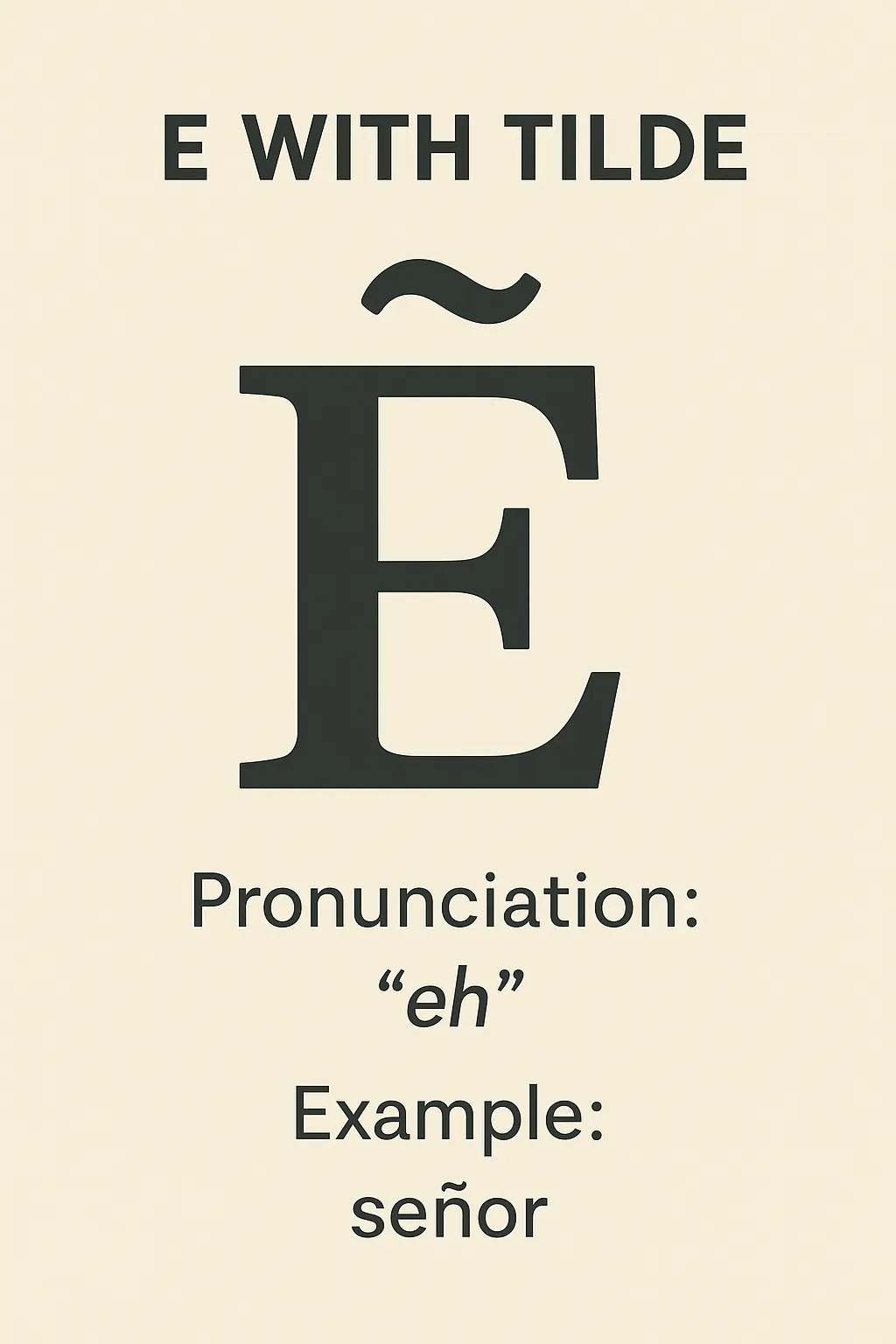
All six also have capital E with accent versions: É, È, Ê, Ë, Ē, Ẽ — covered in full in the tables below.
Why Accents on E Matter?
In languages like French and Spanish, the accent isn’t optional — it’s part of the correct spelling. École (school) is wrong without the accent. Résumé and resume are two entirely different English words. Even in names, dropping the accent changes the word: René, José, and Beyoncé all require their accented letters to be spelled correctly.
Even when writing in English, you’ll encounter these characters in borrowed words — café, naïve, fiancé, exposé, soufflé, cliché — and getting them right looks more professional and accurate.
When Do You Need to Use Accented E?
You may need to type an accented E when:
- Writing names like “José”, “Renée”, or “Beyoncé”
- Using foreign words in English (café, fiancé, exposé)
- Typing in French, Spanish, Portuguese, or German
- Working on school assignments or translations
E with Accent Alt Codes — Complete Table (Windows)
On Windows, you type accented E characters using Alt codes. Hold the Alt key, type the number on the numeric keypad (not the number row above the letters), then release Alt. Num Lock must be ON.
This table covers every e with accent alt code — lowercase and uppercase — along with Unicode and HTML references in one place:
| Character | Name | Alt Code | Unicode | HTML Entity |
|---|---|---|---|---|
| é | Lowercase E with Acute Accent | Alt + 0233 | U+00E9 | é |
| É | Capital E with Acute Accent | Alt + 0201 | U+00C9 | É |
| è | Lowercase E with Grave Accent | Alt + 0232 | U+00E8 | è |
| È | Capital E with Grave Accent | Alt + 0200 | U+00C8 | È |
| ê | Lowercase E with Circumflex | Alt + 0234 | U+00EA | ê |
| Ê | Capital E with Circumflex | Alt + 0202 | U+00CA | Ê |
| ë | Lowercase E with Umlaut | Alt + 0235 | U+00EB | ë |
| Ë | Capital E with Umlaut | Alt + 0203 | U+00CB | Ë |
| ē | Lowercase E with Macron | Alt + 0275 | U+0113 | ē |
| Ē | Capital E with Macron | Alt + 0274 | U+0112 | Ē |
| ẽ | Lowercase E with Tilde | Alt + 7869 | U+1EBD | ẽ |
| Ẽ | Capital E with Tilde | Alt + 7868 | U+1EBC | Ẽ |
Important: Alt codes only work with the numeric keypad on the right side of a full keyboard. On a laptop without a dedicated numpad.
All E with Accent Characters
If you need an accented E for a document, email, social media post, or any text field, use the appropriate character from the list.
Lowercase e with Accent
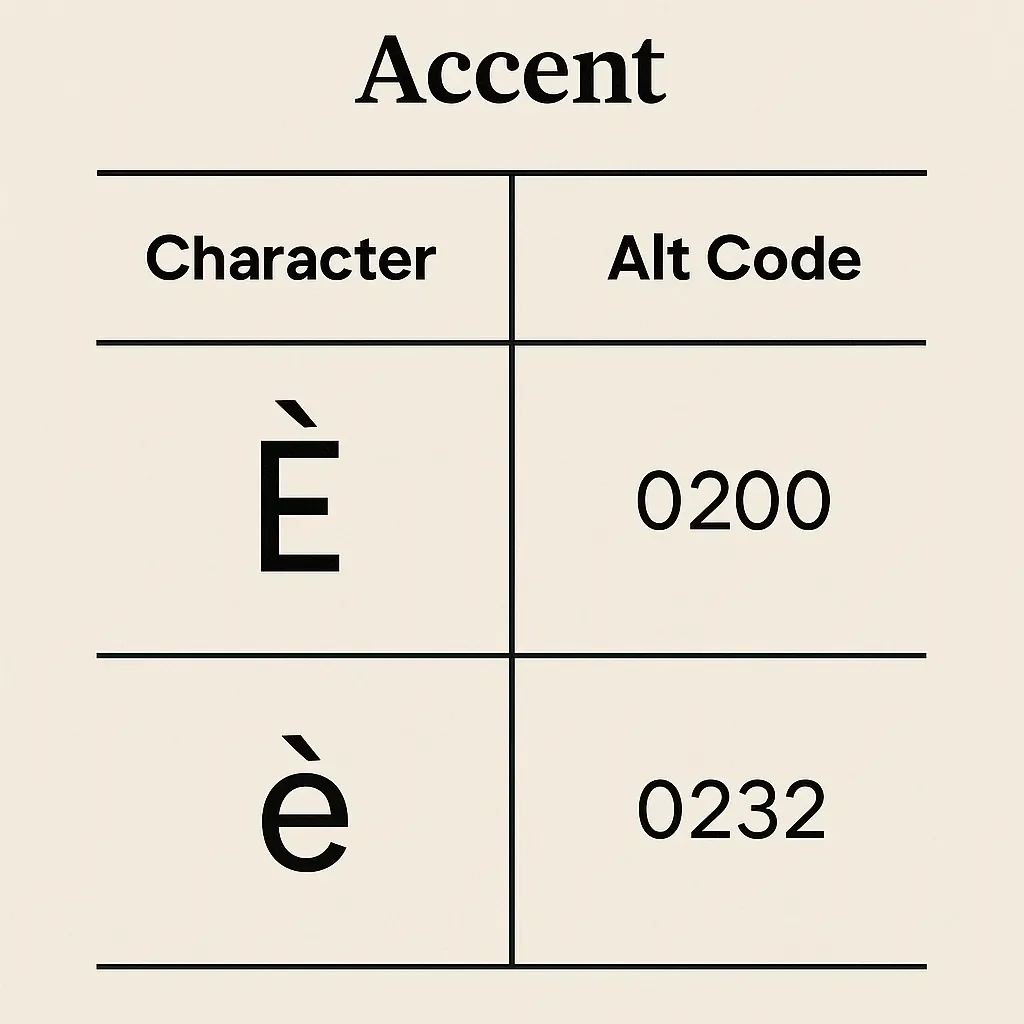
- é — e with acute accent
- è — e with grave accent
- ê — e with circumflex accent
- ë — e with umlaut (diaeresis)
- ē — e with macron
- ẽ — e with tilde
Capital E with Accent
- É — Capital E with acute accent
- È — Capital E with grave accent
- Ê — Capital E with circumflex accent
- Ë — Capital E with umlaut (diaeresis)
- Ē — Capital E with macron
- Ẽ — Capital E with tilde
How to Type E with Accent on Windows — All Methods
1: Alt Codes (Numeric Keypad)
The fastest method for Windows users with a full keyboard. Use the alt code table above — hold Alt, type the code on the numpad, release. Works in Word, Excel, Notepad, browsers, Outlook, and virtually every Windows application that supports Unicode text.
2: US International Keyboard Layout
This is the best method if you frequently type accented letters and don’t want to memorize alt codes. Enable it by going to Settings → Time & Language → Language & Region → Keyboards and adding US International as an input method.
Once active, you type a dead key followed by the letter:
'thene→ é (acute)`thene→ è (grave)^thene→ ê (circumflex)"thene→ ë (umlaut)
To get capital versions, hold Shift when typing the letter. For example, ' then Shift + E gives É.
This same method works on Chromebook — add US International keyboard from Chrome OS Settings → Device → Keyboard → Input Methods.
3: Character Map
Search for Character Map in the Windows Start Menu. Select the font you’re using, find the accented E you need (é, è, ê, ë, ẽ, etc.), click Select then Copy, and paste it into your document. This is ideal when you need a one-off character and don’t want to memorize a code.
4: Canadian Multilingual Standard Keyboard
If you’re in Canada — especially Quebec or a bilingual workplace — you may already have the Canadian Multilingual Standard keyboard layout. This has dedicated keys for accents. Press the acute key then E for é, or the grave key then E for è — no alt codes or extra steps needed.
How to Type E with Accent Mark on Mac
macOS uses Option key combinations that work system-wide. Press the Option key combination for the accent, release the keys, then type E (or Shift + E for uppercase).
- é (acute): Press
Option + E, thenE - É (acute, uppercase): Press
Option + E, thenShift + E - è (grave): Press
Option + `, thenE - È (grave, uppercase): Press
Option + `, thenShift + E - ê (circumflex): Press
Option + I, thenE - Ê (circumflex, uppercase): Press
Option + I, thenShift + E - ë (diaeresis/umlaut): Press
Option + U, thenE - Ë (diaeresis/umlaut, uppercase): Press
Option + U, thenShift + E
For e with tilde (ẽ / Ẽ) and e with macron (ē / Ē), which don’t have a standard Option shortcut, use the Unicode Hex Input method:
- Go to System Settings → Keyboard → Input Sources, click + and add Unicode Hex Input.
- Switch to it from the menu bar.
- Hold Option and type
1EBD→ ẽ | or type1EBC→ Ẽ
How to Type E with Accent Mark in Microsoft Word
Microsoft Word makes it easy to type accented letters like é, è, ê, ë, both manually and automatically. One of the most efficient ways to insert an accented E is by using keyboard shortcuts. For example:
- Press Ctrl + ‘ (apostrophe) followed by E to type é.
- Press Ctrl + ‘ (apostrophe) followed by Shift + E to type É.
- Press Ctrl + ` (grave accent) followed by E to type è.
- Press Ctrl + ` (grave accent) followed by Shift + E to type È.
- Press Ctrl + Shift + ^ (caret) followed by E to type ê.
- Press Ctrl + Shift + ^ (caret) followed by Shift + E to type Ê.
- Press Ctrl + Shift + : (colon) followed by E to type ë.
- Press Ctrl + Shift + : (colon) followed by Shift + E to type Ë.
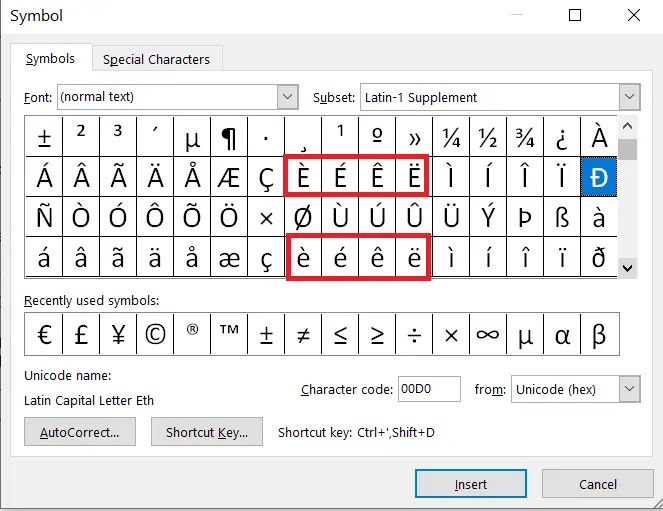
If you prefer menus or need a less common character, go to:
- Insert → Symbol → More Symbols → Latin-1 Supplement subset
- There, you’ll find both lowercase and capital accented: é, è, ê, ë, É, È, Ê, Ë.
How to Type E with Accent in Excel
Excel does not support Word’s Ctrl + key shortcuts. Your options in Excel are:
- Alt codes — the same ones from the table above work in Excel cells (Num Lock must be ON).
- Insert → Symbol — go to the Insert tab, click Symbol, and browse to find the accented E you need.
- Copy and paste — copy from the list on this page and paste directly into the cell. The simplest option for occasional use.
- AutoCorrect — if you type résumé often, set up AutoCorrect (File → Options → Proofing → AutoCorrect Options) to replace a shorthand like resum with résumé automatically.
How to Type E with Accent on Mobile (Android/iPhone)
- Tap the
Ekey on your keyboard and hold it - A pop-up will show all accented E options.
- Slide to select é, è, ê, ë, or their uppercase versions.
Works on Gboard, SwiftKey, iOS default keyboard, and more.
Unicode and HTML Codes for E with Accent (For Developers)
If you’re building a website or working with HTML, use these codes to make sure accented E characters render correctly across all browsers and platforms:
| Character | Unicode | HTML Entity | Decimal |
|---|---|---|---|
| é | U+00E9 | é | é |
| É | U+00C9 | É | É |
| è | U+00E8 | è | è |
| È | U+00C8 | È | È |
| ê | U+00EA | ê | ê |
| Ê | U+00CA | Ê | Ê |
| ë | U+00EB | ë | ë |
| Ë | U+00CB | Ë | Ë |
| ē | U+0113 | ē | ē |
| Ē | U+0112 | Ē | Ē |
| ẽ | U+1EBD | ẽ | ẽ |
| Ẽ | U+1EBC | Ẽ | Ẽ |
É vs È — What’s the Difference?
This is one of the most common questions from people learning French or typing in a Romance language. Both are an E with an accent — but they’re completely different characters with different sounds and uses.
- é (acute) — the accent points upward. It makes a closed “ay” sound, like the E in “they.” Used for stress and a specific vowel quality. Examples: café, été.
- è (grave) — the accent points downward. It makes an open “eh” sound, like the E in “bed.” Examples: très, mère, après.
In terms of typing: é alt code is Alt + 0233 and è alt code is Alt + 0232 — just one number apart, so it’s easy to mix them up. Double-check which direction the accent points before using either code.
What is the alt code for E with accent mark?
The most common e with accent alt codes on Windows: é = Alt + 0233, è = Alt + 0232, ê = Alt + 0234, ë = Alt + 0235. For uppercase: É = Alt + 0201, È = Alt + 0200. For e with tilde: ẽ = Alt + 7869, Ẽ = Alt + 7868. Num Lock must be ON and you must type on the numeric keypad.
What is e with apostrophe on top called?
That’s é — E with acute accent. The mark above it is an acute accent (´), not an apostrophe, though it looks similar. It appears in words like café, résumé, and fiancé. Use Alt + 0233 on Windows or Ctrl + ‘ then E in Word.
What is the é alt code?
The é alt code is Alt + 0233 for lowercase é. For uppercase É, use Alt + 0201. Hold Alt, type the code on the numeric keypad, then release Alt. Make sure Num Lock is ON.
How do I type e with an accent on Chromebook?
Use the US International Keyboard–
Type ' then e → gets you é
What is the difference between é and è?
é has an acute accent (´) that slants upward and makes a closed ‘ay’ vowel sound. è has a grave accent (`) that slants downward and makes an open ‘eh’ sound. Their alt codes are one apart: é = Alt + 0233, è = Alt + 0232.
How do I type e with accent without a numeric keypad?
Yes. Use Character Map on Windows, the accent shortcuts on Mac, the Symbol menu in Word, Special characters in Google Docs, or the long-press E key on your phone.
What is the HTML code for é?
The HTML entity for é is é and for É it is É. You can also use decimal codes: é for é and É for É.
What is the ASCII code for é?
The extended ASCII code for é is 233 (decimal). This corresponds to Alt + 0233 in Windows. The Unicode code point is U+00E9, and the HTML entity is é.
Typing E with an accent isn’t difficult once you know the right method for your device. This guide covers every method you’ll ever need.