How to Type Upside Down Question Mark (¿): Shortcuts & Alt
The upside down question mark (¿)—also called the inverted question mark or Spanish question mark—is a punctuation symbol used mainly in Spanish. It appears at the beginning of interrogative sentences and helps readers understand that a question is being asked before they reach the end.
Whether you are studying Spanish, localizing content, or formatting text, this guide provides every keyboard shortcut, Alt code, and mobile step required to type the inverted question mark (¿) on any device
What Is the Upside Down Question Mark (¿)?
The upside down question mark, or inverted question mark, is a punctuation symbol used at the beginning of interrogative sentences in Spanish. It works together with the standard question mark (?) at the end.
In Spanish, it’s known as:
- Signo de interrogación invertido
- Written as: ¿
Example:
¿Cómo estás?
(How are you?)
This punctuation tells the reader from the start that the sentence is a question, improving clarity and pronunciation.
How to Type an Upside Down Question Mark (¿) on Windows
If you’re wondering how to do question mark upside down on Windows, there are two reliable methods you can use. These work on Windows 10 and Windows 11 and are ideal whether you’re typing occasionally or frequently.
Using Alt Code (Fastest Method)
The fastest way is the upside down question mark alt code:
- Turn on Num Lock (usually indicated by a light on your keyboard)
- Press and hold the Alt key
- While holding Alt, type 0 1 9 1 using the number pad (not the top row numbers)
- Release the Alt key to generate the
¿symbol.
Using Windows Character Map
If you don’t have a numeric keypad, then there is a visual way to find and insert special characters.
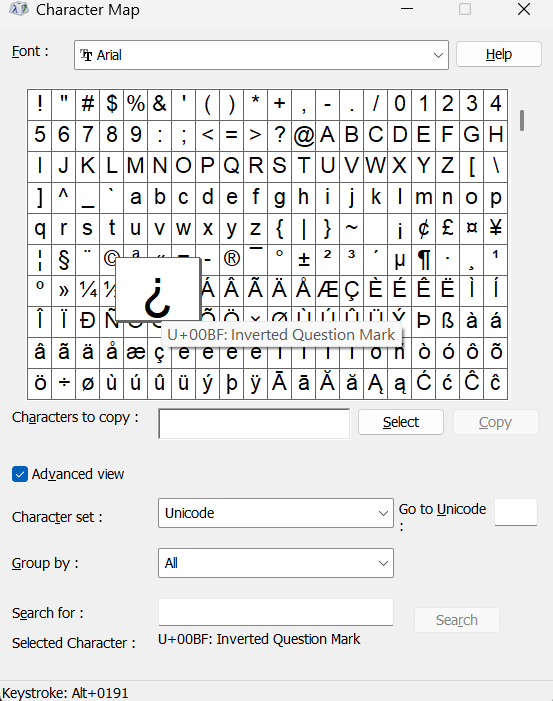
- Click the Start Menu, search for “Character Map” and open it
- In the window, scroll or search to find inverted question mark (¿)
- Click on the symbol to highlight it
- Click the Select button, then click Copy
- Paste it anywhere using Ctrl + V
How to Type Upside Down Question Mark on Mac
If you’re searching how to type upside down question mark on Mac, the good news is that macOS has a simple built-in keyboard shortcut. You don’t need to install anything or switch settings—just use the correct key combination.
Using the Mac Keyboard Shortcut
This is the fastest way to insert the upside down question mark (¿) on any Mac device, including MacBook, iMac, and Mac Mini.
- Place your cursor where you want the symbol to appear
- Press and hold Option (⌥) + Shift
- While holding both keys, press the ? key
- Release all keys to generate the
¿symbol.
How to Get the Inverted Question Mark on Mobile (iPhone & Android)
Mobile operating systems make accessing accents and special symbols highly intuitive via long-press functions.
- Bring up your default virtual keyboard.
- Locate the standard
?key. - Press and hold the key for one second until a small sub-menu pops up.
- Slide your thumb or finger across the screen to highlight the
¿character, then release.
How to Type Upside Down Question Mark on Chromebook
Unicode shortcut method works on most ChromeOS devices and doesn’t require any additional settings.
Using the Unicode Shortcut
Follow these steps to insert the upside down question mark (¿):
- Place your cursor where you want the symbol to appear
- Press Ctrl + Shift + U
- You’ll see a small underlined u appear on the screen
- Type 00BF
- Press Enter or Space
- Result: ¿
Why Does Spanish Grammar Use the Inverted Question Mark?
The implementation of paired punctuation (¿ at the front, ? at the back) was initiated by the Royal Spanish Academy (Real Academia Española) back in the 18th century to elevate reading comprehension.
- Sentence Structure: Spanish sentences can feature identical wording for both statements and questions.
- Tone Modulation: The initial symbol gives readers immediate context, allowing them to shift their vocal inflection or reading tone right from the beginning of the sentence (e.g., ¿Cómo estás?).
Can You Use the Upside Down Question Mark in English?
Grammatically, no. English rules do not acknowledge or require the usage of an inverted question mark. Stylistically, however, creators frequently use it in social media copy, informal forums, and advertising layouts to evoke an emphatic, playful, or highly casual tone (e.g., ¿You’re serious?).
What is the HTML code for the inverted question mark?
Web developers can display the character across browsers securely using either the named HTML entity ¿ or the numeric system reference code ¿.
Final Thoughts
The upside down question mark (¿) is more than just a flipped symbol—it’s an essential part of Spanish grammar that improves clarity and reading flow. Whether you’re searching how to make an upside down question mark, looking for a quick copy paste, or learning Spanish punctuation, understanding this symbol is incredibly useful.
Spanish punctuation also flips exclamations the same way — see the upside down exclamation point (¡) or view our master index of Spanish letters with accents to complete your setup.. For another Spanish-specific character, check Spanish Ñ.