N with Tilde (Ñ / ñ) or Spanish N: Alt & Keyboard Shortcuts
The letter ñ (known as the Spanish N, N with a tilde, or n tilde) is much more than just a regular letter with a decorative mark. In Spanish and several other languages, it is an entirely distinct character representing the soft nasal “ny” sound heard in words like niño and mañana.
Need to type ñ or Ñ right now without digging through endless settings? Copy them straight from here:
- Lowercase:
ñ - Uppercase:
Ñ
What Is the Spanish Ñ and Why Does It Matter?
The tilde (~) above the ñ is a diacritic that alters its pronunciation to the IPA sound /ɲ/. Unlike English—which relies on letter combinations like “ny”—Spanish treats ñ as a completely separate letter that comes right after N in the dictionary.
Using an n instead of an ñ doesn’t just look like a typo; it can completely change a word’s meaning—sometimes with hilarious or embarrassing results:
- año (year) vs. ano (anus)
- niño (child) vs. nino (a male name)
- peña (rock or club) vs. pena (pity or shame)
- Symbol: ñ (lowercase), Ñ (uppercase)
- Unicode: U+00F1 (ñ), U+00D1 (Ñ)
- Pronunciation: Similar to the “ny” sound in canyon
Quick Reference: How to Type Ñ on Any Device
| Device / App | Lowercase ñ | Uppercase Ñ |
| Windows (Num Pad) | Alt + 0241 | Alt + 0209 |
| Mac | Option + N, then n | Option + N, then Shift + n |
| iPhone / iPad | Long-press n | Long-press n |
| Android | Long-press n | Long-press n |
| Microsoft Word | Ctrl + Shift + ~, then n | Ctrl + Shift + ~, then Shift + n |
How to Type N with a Tilde (Ñ / ñ) on Windows
If you need to type the Spanish N on keyboard, Windows offers several methods including Alt codes, international keyboard layouts, and Character Map.
Using Alt Codes (Numeric Keypad)
The most common n tilde alt code shortcuts are:
- Lowercase ñ:
- Make sure “Num Lock” is ON.
- Hold the “Alt” key.
- Type
0241on the numeric keypad. - Release “Alt” → ñ will appear.
- Uppercase Ñ:
- Turn Num Lock ON.
- Hold the “Alt” key.
- Type
0209on the numeric keypad. - Release “Alt” → Ñ will appear.
(Tip: This method only works with the numeric keypad — not the number keys above letters.)
Using the US-International Keyboard Layout
If you frequently type Spanish N, switch to the US-International Keyboard layout:
- Go to Settings → Time & Language → Language & Region.
- Add or enable “US-International” layout.
- Once active:
- For ñ: Press ~ (tilde key), then n.
- For Ñ: Press ~, then Shift + N.
This is faster for regular Spanish typing.
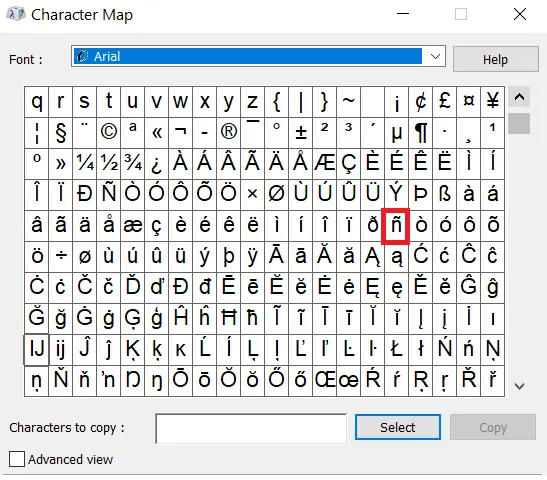
Use Windows Character Map
If you forget shortcuts, you can always copy the N with tilde symbol from the Character Map:
- Press “Windows + R”, type
charmap, and hit “Enter”. - In the Character Map window, scroll or search for “ñ”.
- Select ñ or Ñ, click Copy, then paste where you need it.
N with a Tilde ñ on MacBook
On a Mac, typing n with a tilde is simple and doesn’t require changing layouts.
- Lowercase ñ: Hold Option (⌥) +
n, then pressnagain. - Uppercase Ñ: Hold Option (⌥) +
n, then press Shift + N.
(Tip: macOS also supports emoji & symbol viewer — press Control + Command + Space and search for “ñ” if you forget the shortcut.)
How to Type Spanish N on Chromebook
On Chromebooks, you can use Unicode input:
- Place the cursor where you want the ñ or Ñ.
- Press Ctrl + Shift + U.
- Type the Unicode code:
00F1for ñ00D1for Ñ
- Press Enter to insert the symbol.
(Tip: Chromebook users can also add the International Keyboard layout for faster access Spanish N.)
Typing on iPhone / iPad (iOS)
On mobile Apple devices, the on-screen keyboard has ñ built in:
- Open the keyboard in any app.
- Long press the
nkey. - A small menu will appear — slide your finger to select ñ or Ñ.
How to Type N with a Tilde on Android
Most Android keyboards (Gboard, Samsung Keyboard, SwiftKey) also support ñ easily:
- Open the keyboard.
- Long press the
nkey. - Select ñ or Ñ from the popup.
(Tip: If you type in Spanish often, set your keyboard language to Spanish for direct ñ access.)
What is N with Tilde Unicode and HTML Codes?
The n con tilde character uses different Unicode values for uppercase and lowercase letters.
| Character | HTML Entity | Unicode |
|---|---|---|
| Ñ (Uppercase) | Ñ | U+00D1 |
| ñ (lowercase) | ñ | U+00F1 |
Common Mistakes with N and Ñ
Since n and ñ are completely different letters, replacing one with the other can change the meaning:
- Niño (“child”) vs Nino (a male name, sometimes written without the tilde in foreign contexts)
- Peña (“rock,” “club,” or “group”) vs Pena (“pity” or “shame”)
- Señor (“Mr.” or “sir”) vs Senor (a misspelling or tilde omission, common in English contexts)
In digital writing, if ñ is unavailable, some people write “ny” as a substitute (e.g., senor → senyor), but this is not standard.
The ñ is a distinct letter in Spanish and changes both pronunciation and word meaning compared to the regular letter n. If you are writing full sentences, you will also need to pair it with a Spanish accent or the upside down question mark at the beginning of your text.
Is N with a tilde in ASCII?
It is not in standard ASCII (which only supports basic English letters and symbols). However, it appears in extended ASCII and Unicode. In extended ASCII, you can type it using Alt codes:ñ = Alt + 0241Ñ = Alt + 0209
Is N with a tilde case sensitive?
Yes. Just like any other alphabet letter, ñ and Ñ are distinct from each other. If you use them in passwords, filenames, or programming variables, uppercase and lowercase are treated differently.
Is N with tilde a letter?
Yes. In the Spanish alphabet, ñ is considered a completely separate letter — not just an “n” with an accent. It comes after n in dictionary order and represents a different sound (/ny/ as in “canyon”).
Does English have N with tilde?
No. The letter N with a tilde is not part of the native English alphabet. It only appears in borrowed words, mostly from Spanish, such as piñata, jalapeño, and señor. In English usage, it usually keeps its original Spanish pronunciation.
You forgot my favorite omission.
“Prospero año?”
That’s “prospering year.”
“Prospero ano?”
That’s “prospering ANUS.”
Ha ha ha!