Type I with Accent Mark Í, Ì, Î, Ĩ, Ï, Ī or í, ì, î, ĩ, ï, ī
The letter I with accent marks such as Í, Ì, Î, Ĩ, Ï, Ī, and their lowercase forms (í, ì, î, ĩ, ï, ī) is commonly used in languages like French, Portuguese, Spanish, and German.
This character is commonly searched as i with accent, i accent, accented i, special i, letter i, or i con tilde, depending on the language, pronunciation need, and keyboard layout.
In this post, we will explore the different “I accent mark” and provide comprehensive instructions on how to type “I accent” on different devices, operating systems, and software.
What Is I with an Accent Called? (í, ì, î, ĩ, ï, ī Explained)
The letter I can take different accent marks depending on the language and pronunciation needs.
- An acute accent (Í, í), often searched as “i with apostrophe”, is commonly used in Spanish and Portuguese to mark syllable stress
- A grave accent (Ì, ì) appears mainly in Italian and is often used to indicate stress on a syllable.
- The circumflex accent (Î, î) is used in French and usually reflects historical spelling or subtle pronunciation changes.
- The diaeresis or umlaut (Ï, ï), also called i with two dots, is used in French and German to show that the vowel should be pronounced separately from adjacent vowels.
- The macron (Ī, ī), or i with a line/dash on top, marks a long vowel sound and appears in Latin, Māori, and the romanization of languages like Japanese.
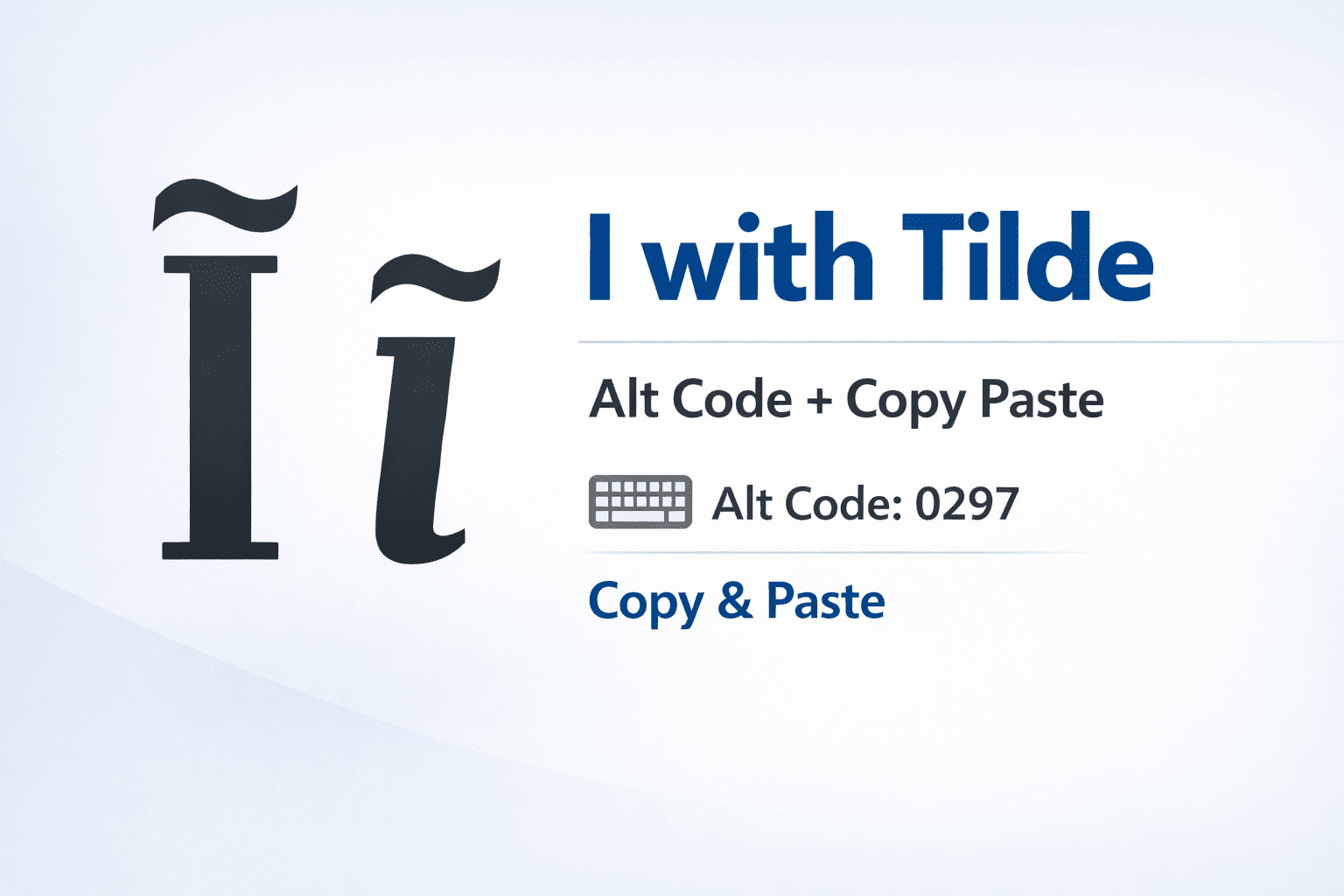
- An I with tilde (Ĩ, ĩ) is primarily found in Portuguese and represents a nasal vowel sound.
I With Accent Pronunciation
- Ì / ì (grave) – In Italian, ì (also written “i accentata”) is pronounced as a stressed “ee” sound.
- Í / í (acute) – In Spanish and Portuguese, í also represents a stressed “ee” sound.
- Î / î (circumflex) – In French, î (called “i accent circonflexe”) usually indicates a longer or historically modified vowel rather than a dramatic sound change.
- Ï / ï (two dots) – The letter ï is pronounced separately from nearby vowels in French and German, where it’s known as “i mit Trema” or “i mit zwei Punkten.”
- Ĩ / ĩ (tilde) – In Portuguese, ĩ produces a nasalized “ee” sound.
- Ī / ī (macron) – In Latin and Māori, the macron simply lengthens the vowel sound without changing its quality — it’s held longer than a plain “i.”
Pronunciation depends on the language, not just the accent mark. The two rarer forms are mostly limited to specialized use: ĩ (tilde) marks a nasalized vowel in Portuguese, Guarani, and phonetic transcription, while ī (macron) marks a long vowel in Latin, Māori, and romanized Japanese (e.g. Tōkyō).
I With Accent in Spanish (I con Tilde / I con Acento)
In Spanish, the accented “í” is often searched as i con tilde or i con acento, though technically the mark itself is called a “tilde” only in casual usage — grammatically it’s an “acento ortográfico” (acute accent). The accented í is used to mark stress on a syllable that would otherwise be pronounced differently, and it also distinguishes word pairs like “mi” (my) from “mí” (me).
There are two main forms:
- í mayúscula con acento (Í) – the uppercase accented I, used at the start of a sentence or in proper nouns.
- í minúscula con acento (í) – the lowercase accented i, the far more common form in everyday Spanish writing.
To type í on a Spanish keyboard layout, press the accent/tilde dead key (usually next to Enter) followed by “i.” On a US keyboard, use the Alt codes, Mac shortcuts, or Word shortcuts listed below — the same “acute accent” method used for other Spanish accented vowels applies to i con acento as well. Learn how to map your entire keyboard for these characters in our Spanish letters with accents hub guide.
How to Type I with Accent on Windows PC
On a Windows PC, you can type an accented I using Alt codes or the Character Map utility. To use an Alt code, press and hold the Alt key while typing the corresponding numeric code on the numeric keypad.
I with Accent Alt Codes
- To type Í (capital I with acute accent), use “Alt + 0205”.
- To type Ì (capital I with grave accent), use “Alt + 0204”.
- To type Î (capital I with circumflex accent), use “Alt + 0206”.
- To type Ĩ (capital I with tilde), use “Alt + 0296”.
- To type Ï (capital I with umlaut or diaeresis), use “Alt + 0207”.
- To type Ī (capital I with macron), use “Alt + 0298”.
- To type í (lowercase i with acute accent), use “Alt + 0237”.
- To type ì (lowercase i with grave accent), use “Alt + 0236”.
- To type î (lowercase i with circumflex accent), use “Alt + 0238”.
- To type ĩ (lowercase i with tilde), use “Alt + 0297”.
- To type ï (lowercase i with umlaut or diaeresis), use “Alt + 0239”.
- To type ī (lowercase i with macron), use “Alt + 0299”.
Use Character Map
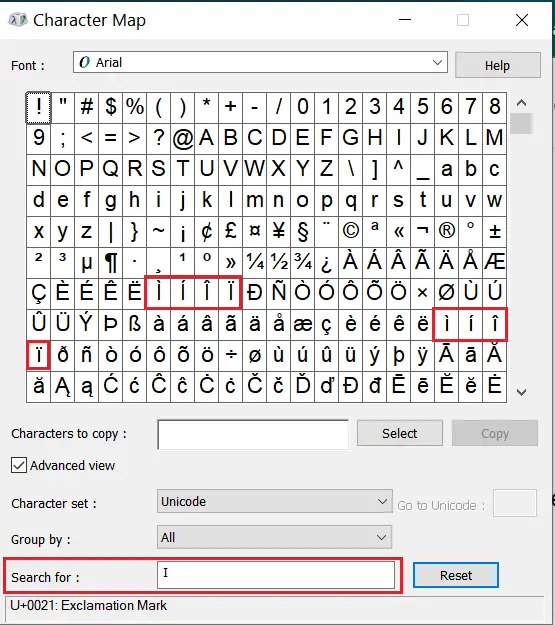
To access the Character Map and find all the I accent mark follow these steps-
- Press the “Windows” key on your keyboard to open the start menu.
- Type “Character Map” in the search bar and press “Enter” to open the Character Map application.
- In the Character Map window, use the search box to find the accented “I” characters.
- To find capital “I” with accents, type “I” in the search box and browse through the list of characters with accents.
- To find small “i” with accents, type “i” in the search box and explore the available characters.
- Click on any accented “I” character to select it, and you’ll see the character details at the bottom of the window.
- Click the “Copy” button to copy-paste the selected accented “I” character to your clipboard.
- Now, you can paste the accented “I” character into any text field or document using “Ctrl + V” or right-clicking and selecting “Paste.”
How to Type I with Accent on Mac
On a Mac, you can type accented I characters using keyboard shortcuts that combine the Option key with different accent keys. After entering the accent shortcut, type the letter I or i to insert the accented character.
Capital I with Accent Mac Shortcuts
- To type Í (capital I with acute accent), press Option + E to activate the acute accent mark and then type an uppercase I.
- To type Ì (capital I with grave accent), press Option + ` (backtick) to activate the grave accent and then type an uppercase I.
- To type Î (capital I with circumflex accent), press Option + I and then type an uppercase I.
- To type Ĩ (capital I with tilde), press Option + N and then type an uppercase I.
- To type Ï (capital I with umlaut or diaeresis), press Option + U and then type an uppercase I.
Lowercase i with Accent Mac Shortcuts
- To type í (lowercase i with acute accent), press Option + E and then type i.
- To type ì (lowercase i with grave accent), press Option + ` (backtick) and then type i.
- To type î (lowercase i with circumflex accent), press Option + I and then type i.
- To type ĩ (lowercase i with tilde), press Option + N and then type i.
- To type ï (lowercase i with umlaut or diaeresis), press Option + U and then type i.
Long-Press Method (Easiest on Mac)
If you don’t want to memorize Option-key combinations, simply press and hold the “i” key on your Mac keyboard. A small popup will appear showing every accented i variant available (í, ì, î, ĩ, ï) — slide your cursor or click to select the one you need. This works the same way in Notes, Pages, Mail, and most macOS text fields.
For ī (macron), which doesn’t have a dedicated Option shortcut, use Unicode Hex Input instead: go to System Settings → Keyboard → Input Sources, add Unicode Hex Input, switch to it from the menu bar, then hold Option and type 012B for lowercase ī, or 012A for uppercase Ī.
How to Type I with Accent on Mobile (iPhone & Android)
Typing an accented I on a phone doesn’t require any special app or setting — it’s built into the standard keyboard on both iOS and Android.
- Open any app with a text field (Messages, Notes, WhatsApp, etc.).
- Tap the “i” key and press and hold it for about a second.
- A small popup will appear showing the accented variants — í, ì, î, ĩ, ï.
- Slide your finger to the character you want and lift to select it.
This works on the default iPhone keyboard as well as Gboard and Samsung Keyboard on Android. If a specific accented character (like ĩ or ī) doesn’t appear in the popup, switch your keyboard language to Spanish, Portuguese, or French in Settings, or use the copy-paste characters from this page instead.
How to Type an I with an Accent in Google Docs
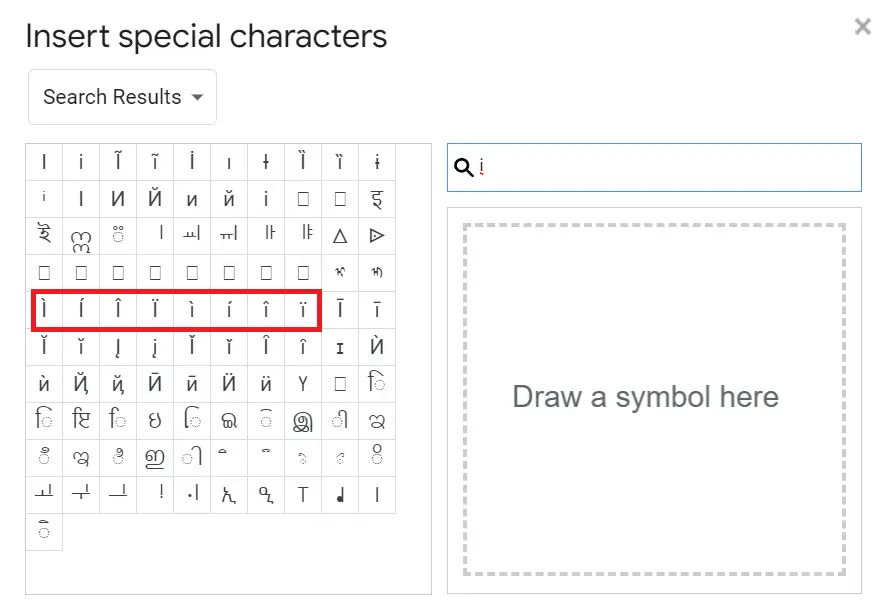
In Google Docs, you can type I accent characters by using the “Special Characters” feature.
- Open your Google Docs document.
- Click on the place in the document where you want to insert the accented “I”.
- Go to the “Insert” option in the top menu bar.
- From the drop-down menu, select “Special Characters.”
- In the “Special Characters” dialog box that appears, type “i” in the search box at the top.
- The search results will display various “I” characters, including accented versions. Scroll through the list or use the search box to find the specific accented “I” character you want.
- Click on the desired accented “I” character to insert it into your Google Docs document.
- The accented “I” character will now appear at the selected location in your document.
How to Make I with Accent in Word
In Microsoft Word, you can type accented “I” characters using keyboard shortcuts or the Symbol function.
I with Accent Keyboard Shortcut
- Place your cursor where you want to insert I with accent mark in Word.
- For Í (Acute Accent): Press and hold the “Ctrl” key and type the apostrophe key (‘) once. Release both keys and then type “I”.
- For Ì (Grave Accent): Press and hold the “Ctrl” key and type the backtick key (`) once. Release both keys and then type “I”.
- For Î (Circumflex Accent): Press and hold the “Ctrl” key and the Shift key, then type the caret key (^) once. Release all keys and then type “I”.
- For Ĩ (Tilde): Press and hold the “Ctrl” key and type the tilde key (~) once. Release the Ctrl key and then type “I”.
- For Ï (Umlaut): Press and hold the “Ctrl” key and the Shift key, then type the colon key (:) once. Release all keys and then type “I”.
- For Ī (Macron): Press “Ctrl + Shift + ,, ” then release and type “I” — or insert it via the Symbol function below, since the macron has no dedicated dead-key shortcut on most Word layouts.
Unicode + Alt+X Method
Word also lets you insert any accented I by typing its Unicode value and converting it, which is useful for the less common tilde and macron forms. Type the four-digit code below directly into your document, then immediately press Alt + X — Word converts the code into the character.
- Type
00CDthen Alt + X → Í | Type00EDthen Alt + X → í - Type
00CCthen Alt + X → Ì | Type00ECthen Alt + X → ì - Type
00CEthen Alt + X → Î | Type00EEthen Alt + X → î - Type
0128then Alt + X → Ĩ | Type0129then Alt + X → ĩ - Type
00CFthen Alt + X → Ï | Type00EFthen Alt + X → ï - Type
012Athen Alt + X → Ī | Type012Bthen Alt + X → ī
Using the Symbol Function
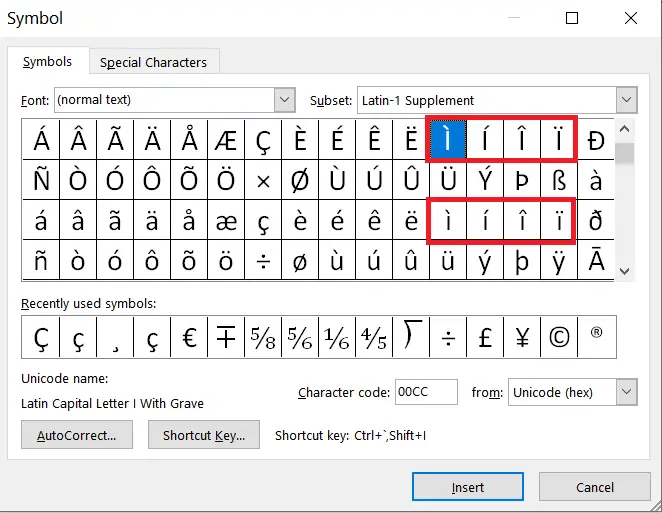
- Place your cursor where you want to insert the accented “I” in your Word document.
- Go to the “Insert” tab in the top menu.
- Click on “Symbol” in the “Symbols” section.
- From the drop-down menu, select “More Symbols”.
- In the “Symbol” dialog box, choose “Latin-1 Supplement” from the “Subset” dropdown menu for the acute, grave, circumflex, and umlaut forms, or “Latin Extended-A” for tilde and macron forms.
- Scroll down and type the letter “I”, you will see all I with accent mark associated with it.
- Click on the accented “I” character to select it, then click the “Insert” button to add it to your Word document.
Unicode and HTML Codes for I with Accent (For Developers)
If you’re building a website or working with HTML, use these codes to make sure accented I characters render correctly across all browsers and platforms:
| Character | Name | Unicode | HTML Entity |
|---|---|---|---|
| í | Lowercase i with Acute Accent | U+00ED | í |
| Í | Capital I with Acute Accent | U+00CD | Í |
| ì | Lowercase i with Grave Accent | U+00EC | ì |
| Ì | Capital I with Grave Accent | U+00CC | Ì |
| î | Lowercase i with Circumflex | U+00EE | î |
| Î | Capital I with Circumflex | U+00CE | Î |
| ï | Lowercase i with Umlaut | U+00EF | ï |
| Ï | Capital I with Umlaut | U+00CF | Ï |
| ĩ | Lowercase i with Tilde | U+0129 | ĩ |
| Ĩ | Capital I with Tilde | U+0128 | Ĩ |
| ī | Lowercase i with Macron | U+012B | ī |
| Ī | Capital I with Macron | U+012A | Ī |
Í vs Ì — What’s the Difference?
Í (acute accent) and Ì (grave accent) are different characters used in different languages. Í points upward and marks stress in Spanish and Portuguese (as in “así” or “aquí”). Ì points downward and appears mainly in Italian (as in “così”), where it also marks a stressed syllable. They are not interchangeable — using the wrong one is a spelling error in both languages.
- Í / í — acute accent, slants up, used in Spanish and Portuguese. Alt code: 0205 / 0237.
- Ì / ì — grave accent, slants down, used in Italian. Alt code: 0204 / 0236.
What is the Alt Code for Î?
The Alt code for Î (uppercase I with circumflex accent) is “Alt + 0206”.
In which languages is the letter “I” commonly accented, and how is it used in each language?
The letter “I” is commonly accented in languages like Spanish, French, Portuguese, and German. Each accent serves different purposes, such as indicating word stress, denoting historical pronunciation changes, distinguishing homographs, or representing nasalization.
What is i with a hat?
That is î, called i with circumflex.
What is i with two dots called?
It’s called i with diaeresis or i with umlaut (ï).
What is i con tilde or i con acento?
“I con tilde” and “i con acento” are the Spanish-language names for the accented í. Technically the mark is an acute accent (acento ortográfico), and it’s used to mark stress or distinguish word pairs like “mi” and “mí.”
What is i with a line or dash over it called?
That is ī, called i with a macron. It marks a long vowel sound and is used in Latin, Māori, and romanized languages such as Japanese.
How do you say “i with accent” in French, Italian, and German?
In French it’s called “i accent aigu” (for í) or “i accent circonflexe” (for î). In Italian it’s “i accentata.” In German it’s “i mit Akzent” (or “i mit Trema” for ï).
- Type O with Accent Mark Ò, Ó, Ô, Õ, Ö
- Type U with Accent Ú, Ù, Û, Ũ, Ü
- Know what is i with two dots
- Type Y with Accent
- Do you know about Thorn Letter?