Type O with Accent Mark Ò, Ó, Ô, Õ, Ö or ò, ó, ô, õ, ö
The O with accent is a commonly used character in many languages, including Spanish, Portuguese, French, German, and Italian. Accents placed on the letter O—such as Ó, Ò, Ô, Õ, Ö—change pronunciation, meaning, or grammatical emphasis.
Accented O has a unique sound, and its usage varies depending on the language and context.
Types of Accents on the Letter O
- Acute Accent (Ó): The acute accent is used in languages such as Spanish, Portuguese, and Icelandic. In Spanish, it marks the stressed syllable, as in corazón (heart). In Portuguese, it often indicates an open-mid vowel sound, as in avó (grandmother).
- Grave Accent (Ò): The grave accent appears in Italian, Catalan, and some dialects of French. It usually marks a more open or distinct vowel quality, as in the Catalan word mòbil (mobile phone) or Italian però (but).
- Circumflex Accent (Ô): The circumflex accent is commonly used in French and Portuguese, and it changes the pronunciation of the letter “O” to a more closed sound.
- Tilde (Õ): The tilde is commonly used in Portuguese to indicate nasalization of the letter “O”.
- Umlaut (Ö): The umlaut (also called diaeresis) is common in German, Swedish, and other languages. It changes “O” into a front rounded vowel, pronounced with the lips rounded but the tongue positioned further forward, as in German schön (beautiful).
How to Type O with an Accent on Windows
To type an O with an accent on a Windows computer, you can use Alt codes or the Character Map utility.
O with Accent Mark Alt Codes
Using Alt codes is one of the easiest ways to type accented O characters on a Windows PC. Hold down the Alt key and enter the corresponding code using the numeric keypad.
Capital O with Accent
- Ò (grave accent): Press and hold Alt and type 0210.
- Ó (acute accent): Press and hold Alt and type 0211.
- Ô (circumflex accent): Press and hold Alt and type 0212.
- Õ (tilde): Press and hold Alt and type 0213.
- Ö (umlaut): Press and hold Alt and type 0214.
- Ǫ (ogonek): Press and hold Alt and type 490.
Small o with Accent
- ò (grave accent): Press and hold Alt and type 0242.
- ó (acute accent): Press and hold Alt and type 0243.
- ô (circumflex accent): Press and hold Alt and type 0244.
- õ (tilde): Press and hold Alt and type 0245.
- ö (diaeresis/umlaut): Press and hold Alt and type 0246.
Using Character Map (Windows)
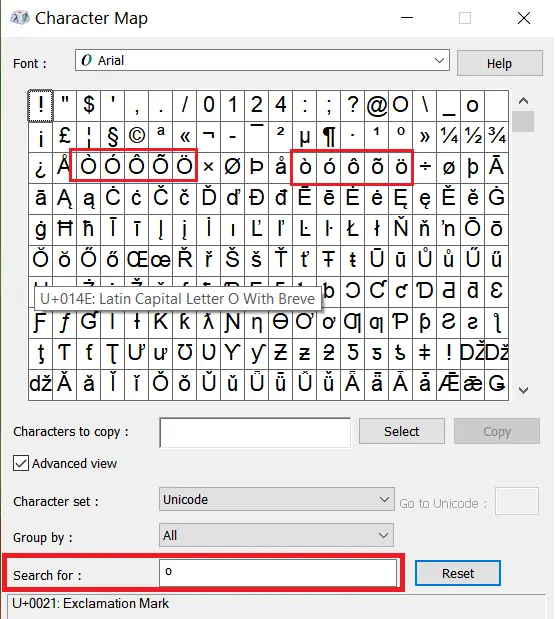
To type different types of O use the Character Map in Windows to insert an “o with accent” character, follow these steps
- Click on the Start menu and search for “Character Map”.
- Open the Character Map application.
- In the search bar, type “o” or “o with accent” and press Enter.
- The accented O will appear. Select the desired O character by clicking on it.
- Click on the “Select” button to copy the O accent to the “Characters to copy” field.
- Click on the “Copy” button to copy the O accent to your clipboard.
- Paste the character into your document or application by pressing “Ctrl + V” or right-clicking and selecting “Paste.”
How to Type O with Accent on Mac
Mac computers include built-in keyboard shortcuts for typing accented O characters. Press the appropriate accent shortcut first, then type either O for uppercase letters or o for lowercase letters.
Capital O with Accent Mac Keyboard Shortcuts
- Ó (acute accent) — Option + E, then Shift + O
- Ô (circumflex accent) — Option + I, then Shift + O
- Õ (tilde) — Option + N, then Shift + O
- Ö (umlaut) — Option + U, then Shift + O
- Ò (grave accent) — Option + `, then Shift + O
Small o with Accent Mac Keyboard Shortcuts
- ó (acute accent) — Option + E, then o
- ô (circumflex accent) — Option + I, then o
- õ (tilde) — Option + N, then o
- ö (umlaut) — Option + U, then o
- ò (grave accent) — Option + `, then o
These keyboard shortcuts work in most Mac applications, including documents, emails, web browsers, and text editors.
How to Type Accented O in Google Docs
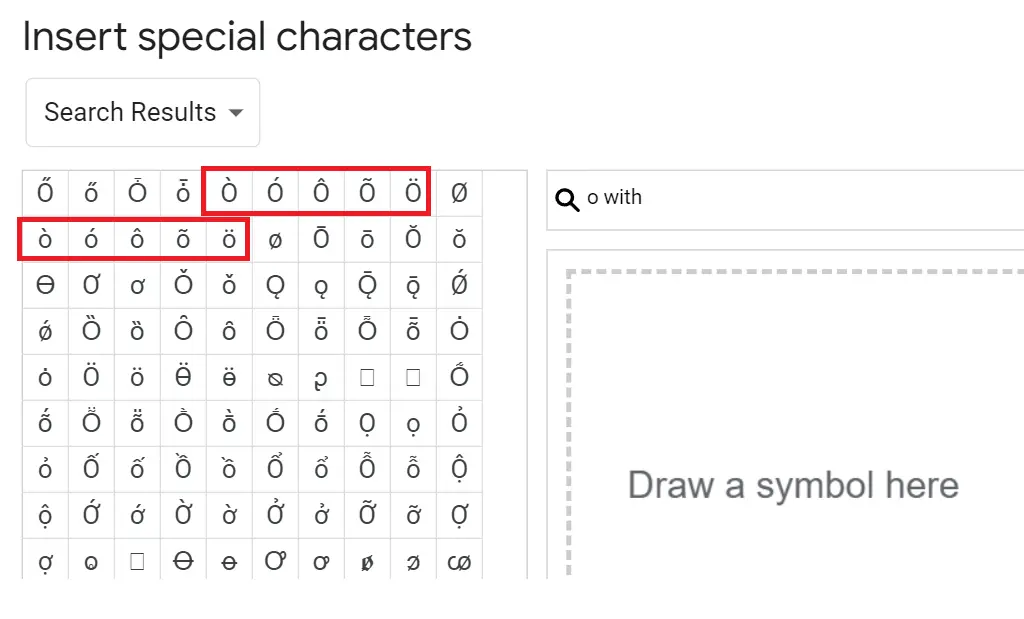
To type “o with accent” in Google Docs, you can use the following steps:
- Open a new Google Docs or an existing one in which you want to add the “o with accent.”
- Click on the place where you want to insert the character.
- Click on “Insert” in the top menu bar.
- Select “Special Characters” from the drop-down menu.
- In the “Special Characters” dialog box, type “o with accent” in the search box at the top of the window.
- Select the desired “o with accent” character from the search results.
- Click on “Insert” to add the character to your document.
How to Type O with an accent in Word
To type O with accent marks in Microsoft Word you can use Microsoft Word shortcut or Symbol function:
Use Microsoft Word shortcut keys:
- Place your cursor where you want to insert the accented letter.
- Press and hold the “Ctrl” key and type the apostrophe key (‘) once.
- Release both keys and type the letter “O” to insert “Ó.”
- For other accent marks, use the following key combinations:
- Ò: “Ctrl + `” (grave accent), release both keys, then type “O”
- Ô: “Ctrl + Shift + ^” (circumflex), release all keys, then type “O”
- Õ: “Ctrl + Shift + ~” (tilde), release all keys, then type “O”
- Ö: “Ctrl + Shift + :” (colon), release all keys, then type “O”
Use Symbol function
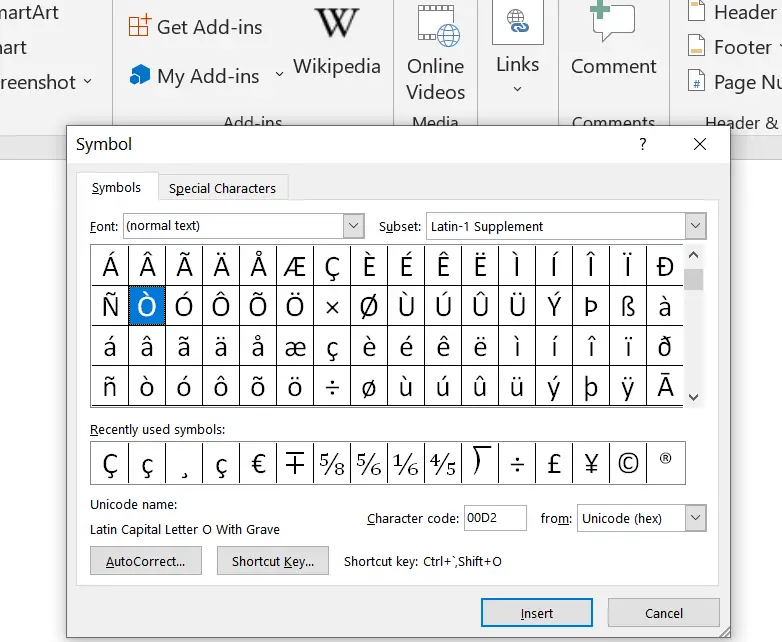
You can use the Insert Symbol function in Microsoft Word to insert the accented letters.
- Place your cursor where you want to insert the accented letter.
- Go to the “Insert” tab and click on “Symbol” in the “Symbols” section.
- Select “More Symbols” at the bottom of the dropdown menu.
- In the “Symbol” tab, choose “Latin-1 Supplement” from the “Subset” dropdown menu.
- Scroll down or use the search box to find the accented O letter you need.
- Click on the letter to select it, then click “Insert” to add it to your document.
How to Type O With Accent on Mobile Devices (iPhone & Android)
iPhone and iPad
- Open the on-screen keyboard
- Press and hold the letter “o”
- A popup will appear showing: ó ò ô õ ö
- Slide your finger to select the character
Android (Samsung, Gboard, SwiftKey)
- Long-press o
- Choose the accented O from the menu
Works across most keyboard apps.
HTML and Code: O With Accent
Use the following HTML entity codes, decimal character references, and Unicode values to display O with accent characters on websites, applications, and digital documents.
- Ò —
Ò—Ò— Unicode: U+00D2 - Ó —
Ó—Ó— Unicode: U+00D3 - Ô —
Ô—Ô— Unicode: U+00D4 - Õ —
Õ—Õ— Unicode: U+00D5 - Ö —
Ö—Ö— Unicode: U+00D6 - ò —
ò—ò— Unicode: U+00F2 - ó —
ó—ó— Unicode: U+00F3 - ô —
ô—ô— Unicode: U+00F4 - õ —
õ—õ— Unicode: U+00F5 - ö —
ö—ö— Unicode: U+00F6
O vs O With Accent: What’s the Difference?
Although they look similar, the standard letter O and its accented variants have different pronunciations and functions across languages.
| Character | Name | Key Difference |
|---|---|---|
| O | Standard O | No accent mark; basic Latin letter |
| Ó | O with Acute Accent | Indicates a specific pronunciation or stress |
| Ò | O with Grave Accent | Marks a different vowel sound or stress pattern |
| Ô | O with Circumflex Accent | Often indicates a historical spelling change or altered pronunciation |
| Õ | O with Tilde | Represents a nasalized vowel sound |
| Ö | O with Umlaut (Diaeresis) | Changes the vowel sound from a standard O |
Using the wrong form can change meaning or sound unnatural.
What does an accent over an O mean?
An accent over an “O” is called an “accent mark” or “diacritic” and can change the pronunciation of the letter “O” in some languages. For example, in French, the accent over the “O” can indicate that the vowel is pronounced with a rounded shape, similar to the “O” sound in “low”.
What are the different O accents?
The different accents of the letter “O” include Ò, Ó, Ô, Õ, Ö, ò, ó, ô, õ, and ö. These O accent can be used in both uppercase and lowercase.
What does Ó mean in Spanish or Portuguese?
In Spanish, Ó usually marks the stressed syllable, for example in corazón (heart). In Portuguese, it can indicate both stress and an open vowel sound, as in avó (grandmother).
How is Õ pronounced in Portuguese?
The letter Õ in Portuguese is nasalized, meaning the sound passes through both the mouth and nose. For example, in nação (nation), the final Õ has a nasal tone.
What is the ˆ symbol over Ô called?
The ˆ mark is called a circumflex accent. In Portuguese and French, it slightly changes the pronunciation of “O,” and sometimes shows that a letter was dropped in older spellings (e.g., avô “grandfather”).
- See our comprehensive guide on how to type Spanish accents across different operating systems
- A with accent
- E with accent character
- I with accent
- O with slash (Ø)
- O with macron (Ō)