How to Type the Euro Symbol (€) on Windows, Mac, Gmail & More
The Euro symbol (€), also known as the euro sign or euro currency symbol, is used in prices, banking, invoices, Microsoft Word, Excel spreadsheets, websites, and online payments across Europe and around the world.
If you want to type the Euro symbol on keyboard, copy and paste the € sign, or use it in Word, Google Docs, HTML, or Mac and Windows devices, this guide explains the easiest methods step by step.
Quick answer if you’re in a hurry: Alt + 0128 on Windows, Option + Shift + 2 on Mac. If neither works or you just want to grab it directly, copy it here: €
Euro Symbol Keyboard Shortcuts
Keyboard shortcuts can vary depending on your operating system, keyboard layout, and language settings.
| Device / Keyboard | Euro Symbol Shortcut |
| Windows with numeric keypad | Alt + 0128 |
| Windows UK keyboard | AltGr + 4 |
| Mac US keyboard | Option + Shift + 2 |
| Mac UK keyboard | Option + 2 |
| Many European keyboards | AltGr + € key |
| Linux / ChromeOS | Ctrl + Shift + U, type 20AC, then Enter |
| iPhone / iPad | Press and hold the $ key and select € |
| Android | Press and hold the currency key and select € |
| Unicode | U+20AC |
How to Type the Euro Symbol on Keyboard (Windows)
Typing the Euro sign (€) is easy if you know the right keyboard shortcut for your system. Below are the steps for Windows Keyboards.
Using the Alt Code
The Alt code method works in many Windows applications.
- Position your cursor where you want the symbol to appear.
- Press and hold the
Altkey. - Type
0128using the numeric keypad (the grid of numbers on the far right of your keyboard). - Release the
Altkey.
Note: This method only works on the dedicated numeric keypad. Typing these numbers on the row above your letter keys will not produce the symbol.
Windows Laptop Without a Numeric Keypad
If your laptop lacks a numeric keypad, you can use the built-in Windows Character Map:
- Open the Start menu and search for Character Map.
- Locate and click on the
€symbol. - Click Select, then click Copy.
- Paste (
Ctrl+V) the symbol into your document.
Windows UK Keyboard
On a UK keyboard layout, the euro symbol can usually be typed with:
AltGr + 4
Keyboard shortcuts depend on the active keyboard layout, so make sure Windows is using the correct UK layout if the shortcut does not work.
How to Type the Euro Symbol on Keyboard (Mac)
Option + Shift + 2 is the standard shortcut on a US Mac keyboard layout. If you’re on a UK Mac layout instead, it’s usually just Option + 2 without Shift — worth testing both if the first doesn’t produce anything.
- Other Layouts: Some Mac keyboards use
Option + EorOption + 5depending on the region
How to Type the Euro Symbol on Linux & ChromeOS
Many Linux configurations and ChromeOS support Unicode input for special characters.
- Hold down
Ctrl+Shift+Uat the same time. - A small underlined “u” will appear on your screen.
- Type the hex code:
20ac - Press
Enter(or the spacebar).
How to Type the Euro Symbol on Mobile Devices
- iPhone / iPad: Open the keyboard, tap the 123 key, press and hold the $ key, and slide to €.
- Android: Open the keyboard, switch to the numbers/symbols layout, press and hold the $ or currency key, and select €.
Euro Symbol Unicode and HTML Codes
Developers and website owners often need the Euro symbol code for HTML or CSS.
| Type | Code |
|---|---|
| Unicode | U+20AC |
| HTML Entity | € |
| HTML Decimal | € |
| HTML Hex | € |
| CSS | \20AC |
How to Type the Euro Symbol in Office Applications
When working inside specific productivity suites, you can use built-in software tools that bypass standard operating system limitations.
Microsoft Word
To insert the Euro sign (€) in Microsoft Office apps like Word, Excel, or PowerPoint is easy.
- Use your operating system shortcut (
Alt + 0128orOption + Shift + 2). - Menu option: Go to Insert → Symbol → More Symbols, find the €, and insert it.
- Unicode shortcut: Type
20AC, then pressAlt + Xto convert it into €.
Microsoft Excel & Google Sheets
- For text, type or paste € normally.
- For financial columns, select the cells and use Format → Number → Currency to keep number formatting consistent.
Google Docs & Gmail
- Google Docs: Go to Insert → Special characters, search for “euro”, or type the Unicode value
20AC. Ensure you select the Euro Sign (€) rather than the older Euro-Currency Sign (₠). - Gmail on Windows: Use your standard Alt code (
Alt + 0128with NumLock on) orAltGr + 4on UK layouts. - Gmail on Mac: Press
Option + Shift + 2(US layout) orOption + 2(UK layout). - Gmail on Mobile (iOS & Android):Open the mobile keyboard, switch to the numbers/symbols layout if necessary, then press and hold the currency key (often
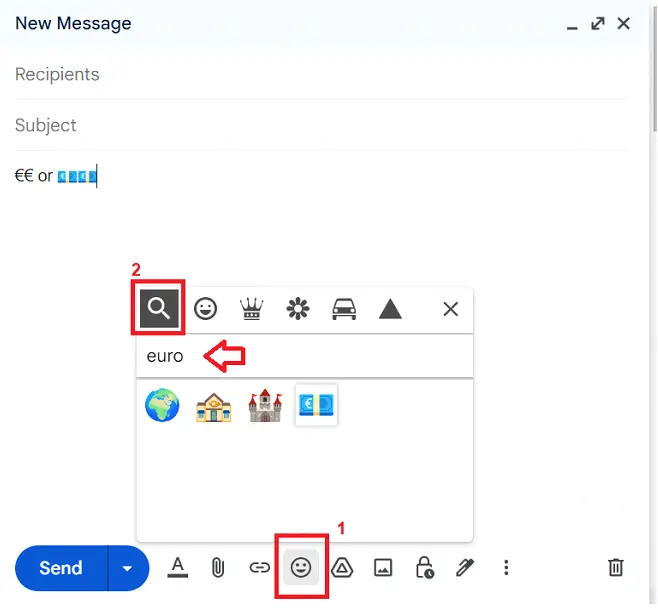
$) and select€. The exact key and available symbols depend on your keyboard and regional settings. Alternatively, use the built-in emoji picker in Gmail and search for “euro”.
Euro Symbol in LaTeX (with Package Examples)
If you’re working with LaTeX and want to insert the Euro sign (€), you need to include a specific package first. Here are three popular options:
Using the textcomp Package
This is the simplest way to display the symbol.
Code:
\usepackage{textcomp}To insert the symbol:
\texteuroThis will output: €
Using the eurosym Package
This package provides multiple styles of the Euro symbol.
Code:
\usepackage{eurosym}You can then use:
\euro– Default Euro\geneuro– Geneva style\officialeuro– Official EU style
Example:
Amount: \euro 5Euro Currency Symbol (₠) – Historic
There’s also a separate Unicode character called the Euro-currency sign (₠), used in older texts:
- Unicode:
U+20A0 - HTML:
₠or₠
Symbol: ₠
What is the sign for Euros?
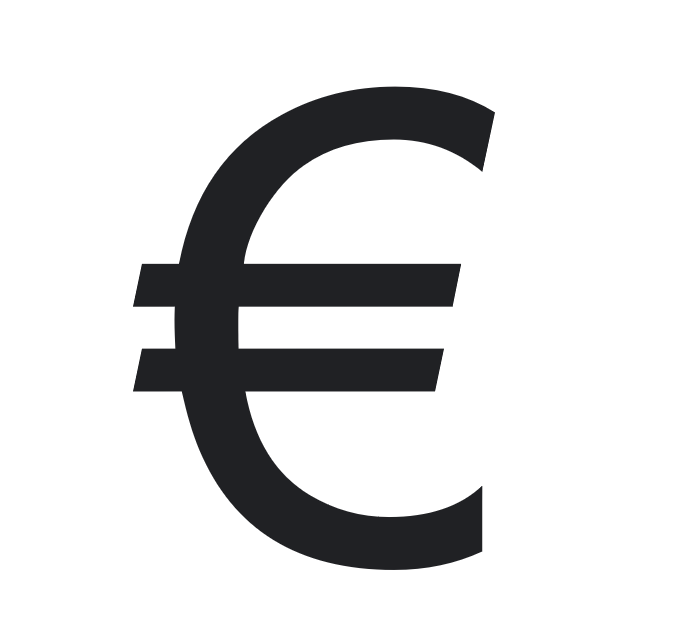
The official Euro symbol (€) resembles the letter “C” with two horizontal lines, symbolizing stability. It was inspired by the Greek letter epsilon (Є) and the Latin letter “E”.
FAQ About Euro Symbol
What Is the Euro Symbol?
The euro symbol € is the currency sign for the euro (EUR), the official currency shared by 20+ member states of the European Union. It was introduced on 1 January 1999 for electronic transactions and entered physical circulation on 1 January 2002.
What is the Euro symbol Alt code?
The Alt code for the Euro symbol is 0128.
Can I use the Euro sign in HTML?
Yes, use € or € to display the Euro sign in HTML.
Where is the Euro symbol used?
The Euro symbol is used across 20+ EU countries in financial documents, pricing, banking apps, and international trade.
Does the Euro Sign Go Before or After the Number?
It depends on regional conventions. English formatting usually places it before the amount (€100), while French typography places it after with a space (100 €).
What is the shortcut for Euro symbol on keyboard?
The most common shortcuts are:
Alt + 0128
Option + Shift + 2 (Mac)
You may also want to learn about the Pound Symbol (£) and how to use it in documents, prices, and websites.
Also see feature like Gmail Spell Check, Gmail Autocomplete, Special Characters Guide and Underscore symbol.