Type U with Accent Ú, Ù, Û, Ũ, Ü or ú, ù, û, ũ, ü
U with an accent mark—such as Ú, Ù, Û, Ũ, Ü (and their lowercase forms ú, ù, û, ũ, ü)—is common in languages like French, Spanish, Portuguese, Italian, German, and Dutch. These accents change pronunciation and word meaning (e.g., Spanish tú meaning “you” vs. tu meaning “your”).
This guide covers how to type U with accent marks across Windows, Mac, Word, Google Docs, iPhone, and Android, along with developer codes.
Types of U Accent Letters Marks
- Ú / ú — U with acute accent: Commonly found in Spanish and Portuguese, the acute accent alters the sound of “U” to be more open. In Spanish this is often searched as u con tilde or u con acento.
- Ù / ù — U with grave accent: Used in Italian and French, the grave accent modifies the pronunciation of “U” to be more closed. Also known as u accent grave or u accentata depending on the language.
- Û / û — U with circumflex: Seen in French, the circumflex accent gives “U” a distinctive sound. French speakers often call this u accent circonflexe, u chapeau, or simply “u with a hat.”
- Ũ / ũ — U with tilde: Often used in Portuguese, the tilde indicates that the “U” is nasalized.
- Ü / ü — U with umlaut or diaeresis:: In German, the umlaut changes the “U” to a rounded and unique sound — searched as u mit umlaut. In Spanish the same mark is called u con diéresis or u con dos puntos, and in Dutch, u met puntjes.
How to Type Accented U on Windows
Windows gives you several ways to enter accented U characters. The best method depends on whether your keyboard has a numeric keypad.
1. Use Windows Alt Codes
If your keyboard has a numeric keypad, Alt codes are convenient for the characters that have standard four-digit codes.
Capital U with Accent Alt Codes
- To type Ú (capital U with acute accent), press and hold the Alt key and type 0218 on the numeric keypad.
- To type Ù (capital U with grave accent), press and hold the Alt key and type 0217 on the numeric keypad.
- To type Û (capital U with circumflex accent), press and hold the Alt key and type 0219 on the numeric keypad.
- To type Ü (capital U with umlaut or diaeresis), press and hold the Alt key and type 0220 on the numeric keypad.
- Ũ (capital U with tilde) isn’t part of Windows’ standard 4-digit Alt code set, since it falls outside the character range those codes can reach. Use the Character Map below instead, or search for its Unicode value (U+0168).
Lowercase u with Accent Alt Codes
- To type ú (lowercase u with acute accent), press and hold the Alt key and type 0250 on the numeric keypad.
- To type ù (lowercase u with grave accent), press and hold the Alt key and type 0249 on the numeric keypad.
- To type û (lowercase u with circumflex accent), press and hold the Alt key and type 0251 on the numeric keypad.
- To type ü (lowercase u with umlaut or diaeresis), press and hold the Alt key and type 0252 on the numeric keypad.
- ũ (lowercase u with tilde) also isn’t available as a standard Alt code — reach for the Character Map, or its Unicode value (U+0169) instead.
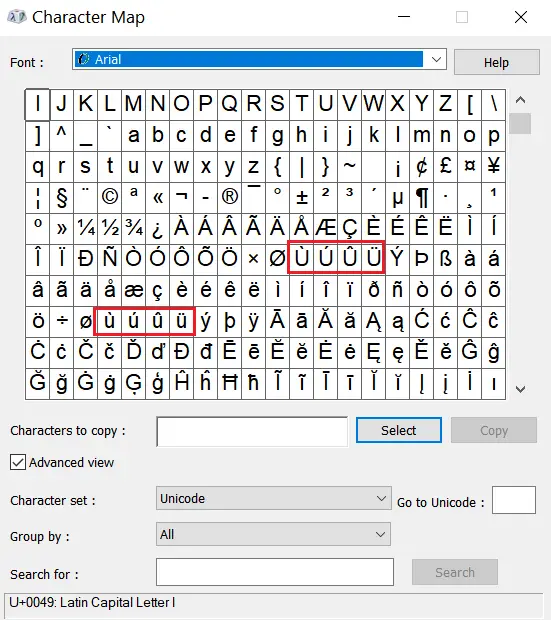
2. Windows Character Map
To access the Character Map and find all U accent marks, follow these steps:
- Press the “Windows” key to open the start menu.
- Type “Character Map” in the search bar and press “Enter” to open the application.
- In the Character Map window, use the search box to locate the accented “U” characters.
- For uppercase “U” with accents, type “U” in the search box and browse the list.
- For lowercase “u” with accents, type “u” in the search box and browse the list.
- Click on an accented “U” character to select it and see the details at the bottom of the window.
- Click the “Copy” button to copy the selected accented “U” character to your clipboard.
- You can now paste the accented “U” character into any text field or document using “Ctrl + V” or by right-clicking and selecting “Paste”.
How to Type U with Accent on a Mac
On a Mac keyboard, you can type U with an accents marks using the Option key shortcuts:
- Ú (Acute Accent): Hold the “Option” key, then press “E” followed by “U”.
- Ù (Grave Accent): Hold the “Option” key, then press “`” (backtick) followed by “U”.
- Û (Circumflex Accent): Hold the “Option” key, then press “I” followed by “U”.
- Ũ (Tilde): Hold the “Option” key, then press “N” followed by “U”.
- Ü (Umlaut): Hold the “Option” key, then press “U” followed by “U”.
| U Accent | Keyboard Shortcut |
|---|---|
| ú (lowercase u with acute) | Option + e, then u |
| û (lowercase u with circumflex) | Option + i, then u |
| ũ (lowercase u with tilde) | Option + n, then u |
| ü (lowercase u with umlaut) | Option + u, then u |
| ù (lowercase u with grave) | Option + `, then u |
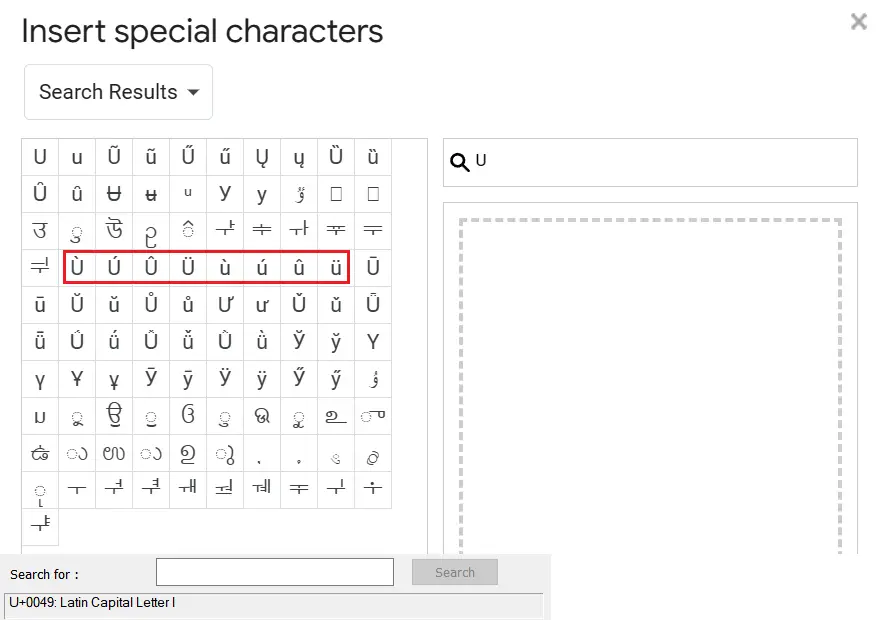
How to Type U with Accent in Google Docs
In Google Docs, you can type U with accent characters using the “Special Characters” feature.
- Position your blinking text cursor where you want the letter to go.
- Go to the “Insert” option in the top menu.
- From the drop-down menu, select “Special Characters”.
- Type “u” into the search field or draw the character in the sketch box.
- Click on the desired accented “U” to insert it into your Google Docs document..
How to Insert U with Accent in Word
In Microsoft Word, you can insert accented “U” characters using keyboard shortcuts.
U with Accent Keyboard Shortcuts
- Ú (Acute Accent): Hold Ctrl and type the apostrophe key (‘) once. Release both keys and then type U.
- Ù (Grave Accent): Hold Ctrl and type the backtick key (`) once. Release both keys and then type U.
- Û (Circumflex Accent): Hold Ctrl and Shift, then type the caret key (^) once. Release all keys and then type U.
- Ũ (Tilde): Hold Ctrl and type the tilde key (~) once. Release the Ctrl key and then type U.
- Ü (Umlaut): Hold Ctrl and Shift, then type the colon key (:) once. Release all keys and then type U.
Insert U with Accent Using Word’s Symbol Menu
If you’d rather not memorize the dead-key shortcuts above, Word’s Symbol menu works for every accented U character, including Ũ and ũ:
- Place your cursor where you want the accented U.
- Open the Insert tab.
- Click Symbol, then More Symbols.
- Find the accented U character you need and click Insert.
How to Type U with Accent on iPhone and Android
On mobile, you don’t need any codes — accented letters are built into the on-screen keyboard’s long-press menu.
iPhone (iOS)
- Open any app with a text field (Notes, Messages, etc.).
- Press and hold the letter “u” on the keyboard.
- A popup will appear showing ú, ù, û, ü, ū, and ũ.
- Slide your finger to the accented version you want and release.
- To type a capital accented U, tap “Shift” first, then press and hold “U” the same way.
Android (Gboard and most keyboards)
- Open any app with a text field.
- Press and hold the “u” key.
- A row of accented options will pop up above the key.
- Slide to the accent you need and lift your finger to select it.
- If your keyboard language is set to Spanish, French, German, Italian, or Portuguese, more region-specific accented U options will appear automatically.
Unicode and HTML Codes for U with Accent
If you’re building a website, writing HTML/CSS, or need the technical reference for a U with accent character, here are the Unicode code points and HTML entity codes for each one:
| Character | Unicode | HTML Entity (Named) | HTML Entity (Numeric) |
|---|---|---|---|
| Ú | U+00DA | Ú | Ú |
| ú | U+00FA | ú | ú |
| Ù | U+00D9 | Ù | Ù |
| ù | U+00F9 | ù | ù |
| Û | U+00DB | Û | Û |
| û | U+00FB | û | û |
| Ũ | U+0168 | Ũ | Ũ |
| ũ | U+0169 | ũ | ũ |
| Ü | U+00DC | Ü | Ü |
| ü | U+00FC | ü | ü |
How do you type ú on a keyboard?
On Windows, hold Alt + 0250. On Mac, press Option + e, then u
What is the keyboard shortcut for ü?
On Windows, type Alt + 0220 for Ü (uppercase) or Alt + 0252 for ü (lowercase). On Mac, press Option + u, then u.
How do you get the û symbol?
On Windows, type Alt + 0219 for Û or Alt + 0251 for û. On Mac, press Option + i, then u. This accent is also called a circumflex, or informally “u with a hat” (u chapeau in French).
What does a ú accent mean?
The acute accent (ú) usually indicates a stressed syllable or a different vowel quality, common in Spanish, Portuguese, and other languages.
How is ú pronounced in Spanish?
In Spanish, ú is the stressed form of “u.” For example, in “tú” (you), the accent shows that the word is stressed differently from “tu” (your).
How do you type ù with a grave accent?
On Windows, hold Alt + 0249 for lowercase ù, or Alt + 0217 for capital Ù. On Mac, press Option + ` (backtick), then u.
Is “u with umlaut” the same as “u with two dots”?
Yes — ü is the same character whether you call it an umlaut (the German linguistic term) or “u with two dots” (a description of how it looks). Spanish speakers usually call it u con diéresis or u con dos puntos, and Dutch speakers call it u met puntjes. For a full walkthrough of shortcuts and codes just for this character, see our U with two dots guide.
How do you type u with an accent on iPhone or Android?
Press and hold the u key on your on-screen keyboard until a popup of accented options appears, then slide to the one you want and lift your finger.