How to Make a Fraction in Word: 4 Easy Methods
Whether you are searching for how to make a fraction in Word, how to write a fraction in Word, or how to add fractions in Word for a math worksheet, there are several reliable ways to do it. The best method depends entirely on whether you need a common fraction, a specific preformatted symbol, or a complex mixed number.
Note: While formatting is slightly different from writing fractions in Google Docs, Microsoft Word’s built-in AutoCorrect, Symbol libraries, and Equation systems give you much deeper control.
Fastest Way: AutoCorrect for Common Fractions
Word can automatically convert typed text (like 1/2) into a professional fraction symbol (½) as you type. However, this setting is not always turned on by default.
How to Turn on Fraction AutoFormat:
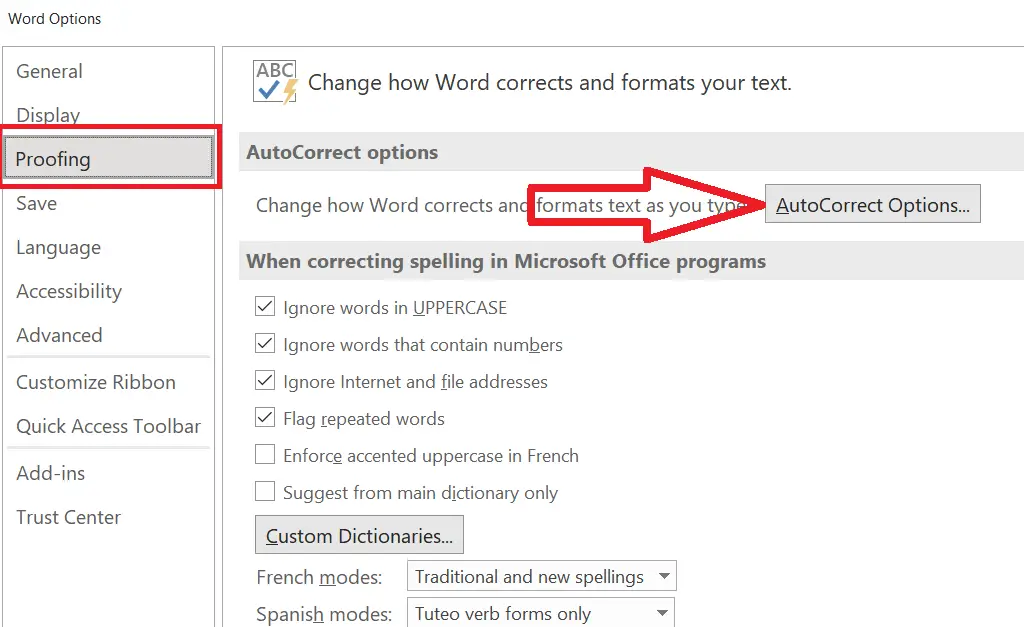
- Click File in the top left corner and select Options.
- In the Word Options window, navigate to the Proofing tab.
- Click the AutoCorrect Options… button.
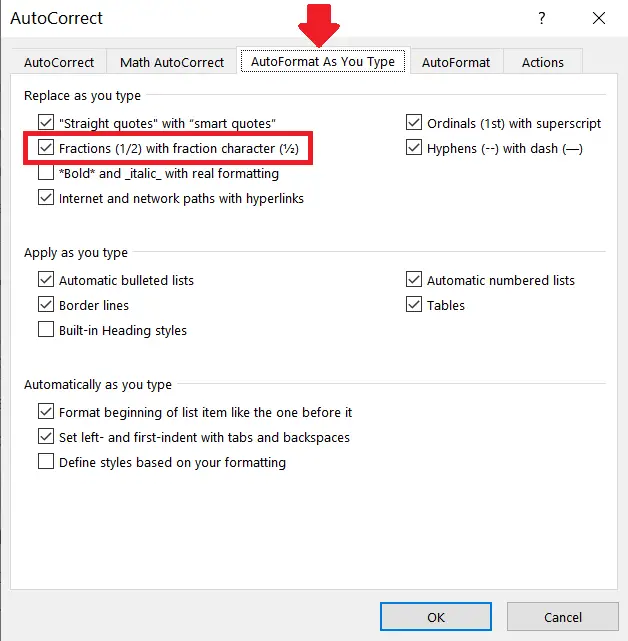
- Switch to the AutoFormat As You Type tab.
- Check “Fractions (1/2) with fraction character (½)” and click OK.
AutoCorrect only converts a limited set of common fractions (such as 1/2, 1/4, and 3/4). For custom numbers like 5/8 or 2/3, use the Symbol or Equation methods below.
How to Write Fractions in Word with the Symbol Menu
Word has a wider built-in set of fraction characters than AutoCorrect alone will give you:
- Place your cursor where you want the symbol to appear.
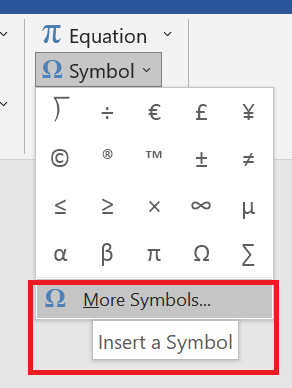
- Go to the Insert tab and click on Symbol (then click More Symbols).
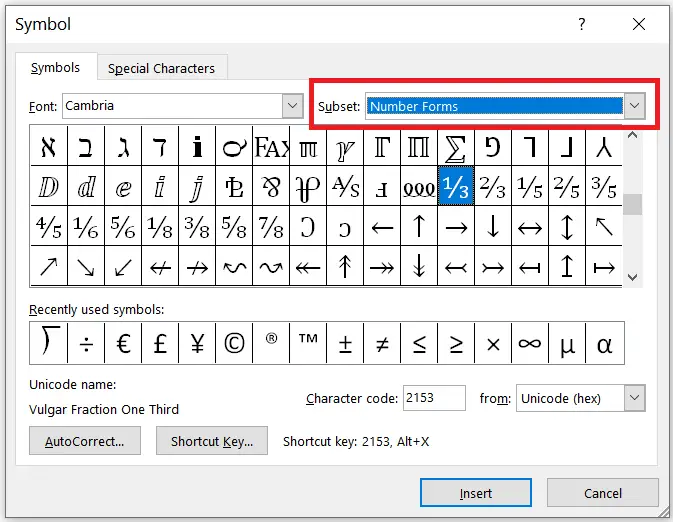
- Under the Subset dropdown menu, select Number Forms.
- Browse and double-click the fraction you need — options here include ⅕, ⅙, ⅚, ⅝, beyond what AutoCorrect covers.
How to Make Fractions in Word: Mixed Numbers via Equation Editor
This is the most powerful method. It handles any custom numerator and denominator, improper fractions, mixed numbers, and fractions combined with other algebraic notations.
- Open your Microsoft Word document.
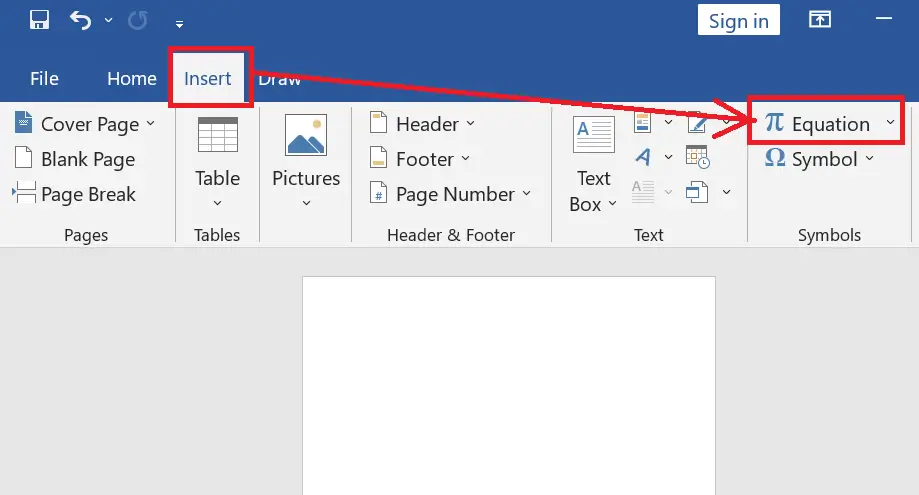
- Click Insert → Equation (or press Alt + =).
- In the Equation Tools tab that appears, click Fraction.
- Select your preferred format (e.g., Stacked Fraction or Skewed Fraction).
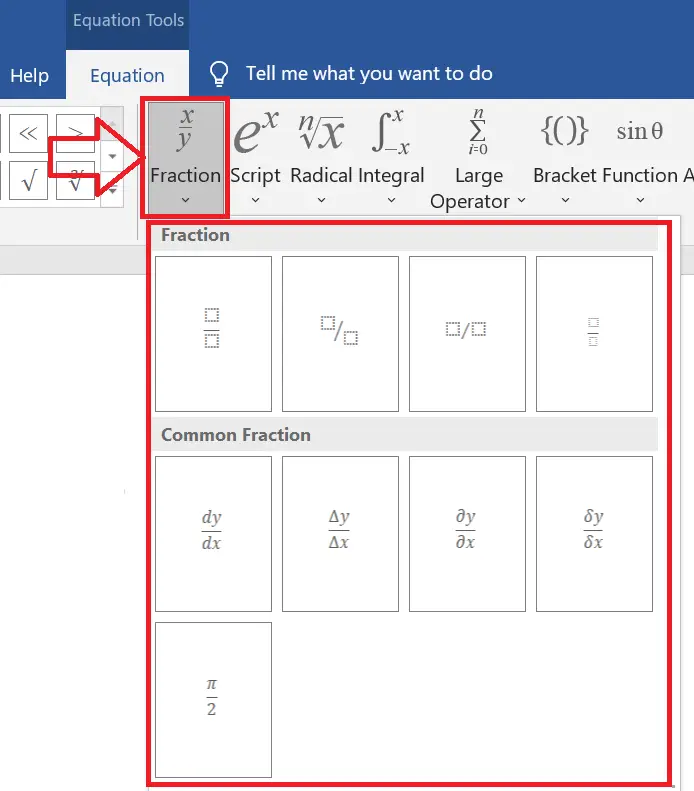
- Click into the box templates in your document to type your numerator and denominator.
If you need to include division notation alongside a fraction, you can also access radical and bracket houses within this same menu layout.
Draw with Ink Equation
If you would rather draw a fraction freehand without clicking through menus, Word can instantly interpret your handwriting.
- Place your cursor where you want the fraction.
- Click the Insert → Equation dropdown arrow, then choose Ink Equation.
- Draw the fraction by hand in the Math Input Control box.
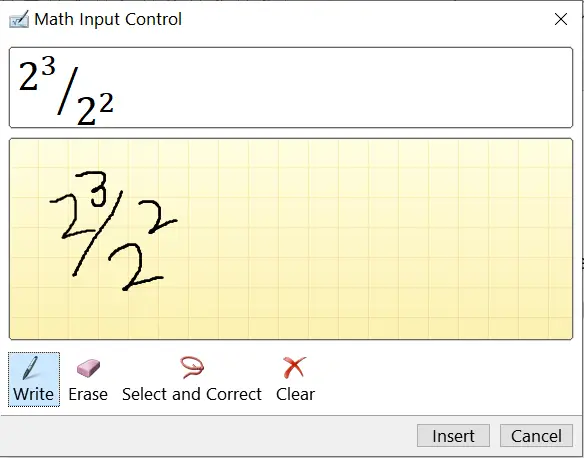
- Once Word correctly recognizes the shape in the preview window, click Insert.
FAQ About Fractions in Word
How do I make a fraction in Word automatically?
Turn on AutoCorrect’s fraction conversion: File → Options → Proofing → AutoCorrect Options → AutoFormat As You Type, then check “Fraction (1/2) with fraction character (½).”
How do I type a mixed number fraction in Word?
Use Insert → Equation, click Fraction, choose a style, and type the whole number followed directly by the fraction.
Why won’t AutoCorrect convert my fraction in Word?
AutoCorrect only converts a limited set of common fractions (1/2, 1/4, 3/4, and similar). For anything else, use Insert → Symbol → More Symbols (Number Forms subset) or the Equation Editor.
Is there a fraction symbol in Word’s Symbol menu?
Yes — Insert → Symbol → More Symbols, then select Number Forms under Subset for a wider range of preformatted fractions like ⅕, ⅙, and ⅚
Related: special characters in Google Docs and Sheets, division and long division symbols.