Euro Symbol (€): How to Type, Copy, and Use Euro Sign on Any Device
The Euro symbol (€)—also called the euro sign or euro currency symbol—represents the official currency of the Eurozone. It is widely used in pricing, banking, accounting, e-commerce, invoices, and international trade.
Whether you’re wondering where the Euro sign is on your keyboard, how to copy and paste the € symbol, or how to insert it in Word, Google Docs, HTML, or LaTeX, this complete guide covers everything in one place.
Quick Answer: How to Type the Euro Symbol (€)
Quick Answer:
- Windows: Press Alt + 0128 (numeric keypad)
- Mac: Press Option + Shift + 2
- Linux: Press Ctrl + Shift + U, type 20ac, then Enter
- Mobile: Long-press
$or£and select € - Unicode: U+20AC
Euro Symbol (€) on Keyboard – All Shortcuts Explained
If you’re searching for the Euro symbol on a keyboard, the shortcut depends on your operating system and keyboard layout. Below are the most reliable methods.
How to Type the Euro Symbol (€) on Windows
Typing the Euro sign (€) is easy if you know the right keyboard shortcut for your system. Below are the steps for Windows Keyboards.
Windows Keyboard Shortcuts
- Alt Code: Press and hold
Alt, then type0128on the numeric keypad → € - Shortcut: Press
Ctrl + Alt + Eon some keyboard - French Keyboard: Press
AltGr + E - UK/US Extended Layouts: You may also try
AltGr + 4depending on your keyboard settings.
If the Euro Symbol Is Not Working on Windows
- Make sure Num Lock is enabled
- Use the Character Map:
Search Character Map → select € → Copy
How to Type the Euro Symbol (€) on Mac (MacBook & iMac)
- Standard Shortcut: Press
Option + Shift + 2to get €. - Other Layouts: Some Mac keyboards use
Option + EorOption + 5depending on the region
How to Type the Euro Symbol (€) on Linux & Ubuntu
- Unicode Method: Press
Ctrl + Shift + U, then type20ac, and pressEnter. The Euro sign (€) will appear. - Compose Key (if enabled): Press the Compose key, then type
=E.
To use the Compose key, you may need to enable it in your system settings.
Euro Symbol (€) Copy and Paste
If you just want a quick way to use the Euro symbol, click the button below to copy it:
€Euro Symbol on UK and US Keyboards
These shortcuts work on most standard UK and US keyboard layouts.
- US Keyboard:
Alt + 0128 - UK Keyboard:
AltGr + 4
Euro Symbol Unicode and HTML Codes
Unicode
- Unicode:
U+20AC - Decimal:
€→ € - Hex Code:
€→ €
HTML Entity
€→ €
CSS
content: "\20AC";
Euro Sign in Microsoft Office (Word, Excel, PowerPoint)
To insert the Euro sign (€) in Microsoft Office apps like Word, Excel, or PowerPoint is easy.
- Keyboard Shortcut: Press
Ctrl + Alt + Eon your keyboard. This works on most modern Windows systems with a standard keyboard layout. - Insert from Menu: Go to Insert → Symbol → More Symbols, then select the Euro sign (€) from the list.
Euro Sign in Google Docs and Google Sheets
- Method 1: Go to Insert → Special Characters, then search for “Euro”
- Method 2: Press
Ctrl + Shift + Uthen type20ac
Euro Symbol in LaTeX (with Package Examples)
If you’re working with LaTeX and want to insert the Euro sign (€), you need to include a specific package first. Here are three popular options:
Using the textcomp Package
This is the simplest way to display the symbol.
Code:
\usepackage{textcomp}To insert the symbol:
\texteuro➡️ This will output: €
Using the eurosym Package
This package provides multiple styles of the Euro symbol.
Code:
\usepackage{eurosym}You can then use:
\euro– Default Euro\geneuro– Geneva style\officialeuro– Official EU style
Example:
Amount: \euro 5Using the marvosym Package
This package offers bold and stylistic variations of the Euro symbol.
Code:
\usepackage{marvosym}Available commands:
\EUR– Standard Euro\EURhv– Heavy version\EURcr– Condensed round\EURtm– Euro with ™ symbol
Example:
Price: 100 \EURTip: Make sure to compile your LaTeX document using a compiler that supports the package you’re using (like pdflatex).
Euro Currency Symbol (₠) – Historic
There’s also a separate Unicode character called the Euro-currency sign (₠), used in older texts:
- Unicode:
U+20A0 - HTML:
₠or₠
Symbol: ₠
Where to Use the Euro Symbol
- In invoices and receipts
- In banking and accounting software
- In online stores and product pricing
- On websites and in HTML code
- In official contracts, financial reports, and more
Does the Euro Sign Go Before or After the Number?
In most European countries, the Euro sign is written before the number, like €100. However, in countries like France or Germany, it may appear after the number (e.g., 100 €). Always follow local standards when formatting currency.
Euro Logo Design
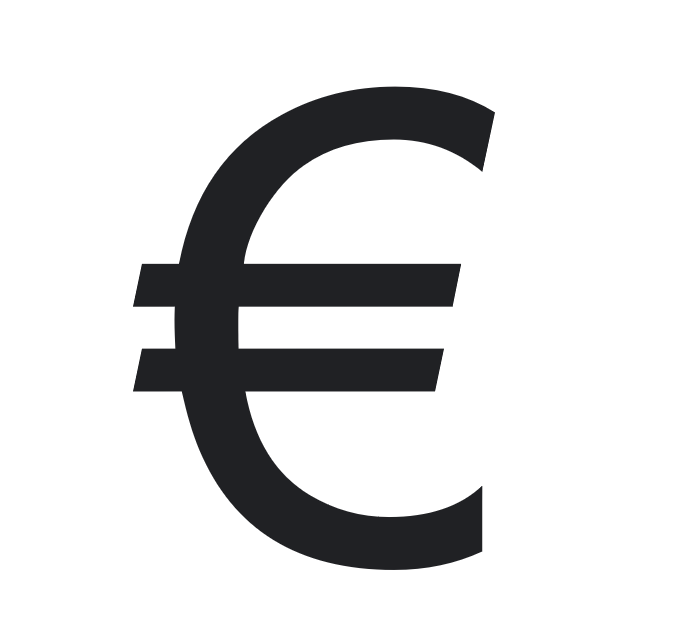
The official Euro symbol (€) resembles the letter “C” with two horizontal lines, symbolizing stability. It was inspired by the Greek epsilon (Є) and the Latin letter “E”.
FAQ About Euro Symbol
How do I type the Euro sign on Windows?
Press Alt + 0128 using the numeric keypad, or use Ctrl + Alt + E.
What is the Euro symbol Alt code?
The Alt code for the Euro symbol is 0128.
Can I use the Euro sign in HTML?
Yes, use € or € to display the Euro sign in HTML.
Where is the Euro symbol used?
The Euro symbol is used across 20+ EU countries in financial documents, pricing, banking apps, and international trade.
Related: How to Type Euro Symbol in Gmail, Special Characters Guide, Underscore symbol.
You may also want to learn about the Pound Symbol (£) and how to use it in documents, prices, and websites.