A with Umlaut (Ä, ä) – A with Two Dots Alt Codes & Typing Guide
A with umlaut (ä / Ä) – also known as the ä symbol, umlaut a, a diaeresis, or simply a with two dots — is a special character used in several European languages, most notably German, Swedish, and Finnish. While it may look like a normal “a” with two dots on top, this small mark completely changes how the letter sounds and how words are understood.
In this guide, you’ll learn everything about the ä character: what it means, how to pronounce a with umlaut, and most importantly, how to type a with umlaut on Windows, Mac, iPhone, Android, and other devices.
You’ll also find Alt codes for ä, keyboard shortcuts, Unicode and HTML codes for both capital A with umlaut (Ä) and lowercase a with umlaut (ä).
What Is A with Umlaut (Ä, ä)?
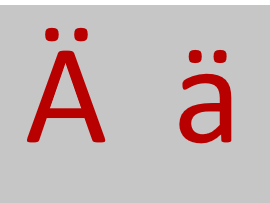
A with umlaut is the letter A with a diaeresis (¨) placed above it: ä in lowercase and Ä in uppercase. The two dots are called an umlaut in German.
- Lowercase: ä
- Uppercase: Ä
- Name: A with umlaut / A with two dots
- Unicode: U+00E4 (ä), U+00C4 (Ä)
In German, ä is considered a modified vowel and represents a different sound than a normal a. It’s not just stylistic — replacing ä with a can change a word’s meaning.
Example:
- schon = already
- schön = beautiful
How to Pronounce A with Umlaut
The pronunciation of ä depends on the language, but in German it’s usually pronounced like:
- The “e” in “bed” (short ä), or
- A longer, more open sound similar to “air” (long ä)
Examples:
- Männer → men
- Bär → bear
- spät → late
In Swedish and Finnish, the sound is also different from plain a and closer to an open front vowel.
A simple tip: don’t pronounce ä like “ah.” Instead, shape your mouth as if saying e, but open it slightly more.
How to Type A with Umlaut on Keyboard
Typing a with umlaut (ä) is easy once you know the right shortcut for your device. Whether you’re on Windows, Mac, mobile, or Chromebook, here are the most reliable ways to type both lowercase ä and capital Ä.
On Windows (Alt Codes for Ä)
On a Windows PC, the fastest way to type ä is by using Alt codes with the numeric keypad.
- ä (lowercase) → Hold
Altand type0228 - Ä (capital) → Hold
Altand type0196
Make sure Num Lock is ON and use the number pad, not the top row of numbers.
This method works in most apps like Word, Notepad, browsers, and email.
On Mac (Keyboard Shortcut)
On macOS, Apple provides simple keyboard shortcuts for umlaut letters:
- ä →
Option + U, then pressA - Ä →
Option + U, then pressShift + A
First press Option + U to activate the umlaut mark, then type the letter A.
This works across macOS in Pages, Word, browsers, and more.
On iPhone/Android:
Android keyboards also support accented characters:
- Open your keyboard.
- Long-press “a”.
- Choose ä from the options.
Some keyboards may show Ä when you’re in caps mode.
How to Type A with Two Dots on Chromebook
On Chromebooks, you can use the US-International layout or a built-in shortcut:
- Press
Ctrl + Shift + U - Release, then type
00E4and pressEnter→ ä - For capital:
00C4→ Ä
This uses Unicode input and works anywhere on Chrome OS.
How to Insert A with Umlaut in Microsoft Word
Microsoft Word offers multiple built-in ways to insert a with two dots, both by shortcut and menu.
A with Umlaut Shortcut in Word
Word supports accent shortcuts similar to Mac:
- ä → Press
Ctrl + Shift + :then pressA - Ä → Press
Ctrl + Shift + :then pressShift + A
You’ll see the umlaut appear over the letter instantly.
Insert Ä Using Symbol Menu
You can also insert it manually:
- Go to Insert → Symbol → More Symbols.
- Choose Latin-1 Supplement or Latin Extended.
- Find ä or Ä and click Insert.
This method is useful if you forget shortcuts.
How to Type A with Umlaut in Google Docs
In Google Docs, use the built-in Special Characters tool:
- Click Insert → Special characters.
- In the search box, type “a umlaut” or “ä”.
- Click the symbol to insert it.
You can also draw the character if needed.
Alt Codes for A with Two Dots (Windows)
Alt codes are popular among Windows users who type symbols often.
Alt Code for Lowercase ä
- ä →
Alt + 0228
Alt Code for Capital Ä
- Ä →
Alt + 0196
Remember: Use the numeric keypad with Num Lock enabled.
Unicode and HTML Code for Ä Symbol
If you’re working with websites, coding, or HTML writing, these technical codes are helpful.
| Character | Unicode | HTML Entity | HTML Number |
|---|---|---|---|
| ä | U+00E4 | ä | ä |
| Ä | U+00C4 | Ä | Ä |
What is ä called?
It’s called a with umlaut or a diaeresis. In German, it’s known as Umlaut-A.
Is ä used in English?
Not in standard English words, but it appears in loanwords, names, and foreign terms.
Can I use Ä in passwords or usernames?
Yes, on most modern systems. But some websites may not allow special characters, so check first.
Also see different type of A with accent mark, O with umlaut