Upside Down Exclamation Point (¡): Copy, Keyboard Shortcuts
The upside down exclamation point (¡)—also called the inverted exclamation mark or Spanish exclamation mark —is a punctuation symbol used mainly in Spanish. It appears at the beginning of exclamatory sentences and helps readers understand tone before finishing the sentence.
In this complete guide, you’ll learn:
- What the upside down exclamation mark is called
- Why it’s used in Spanish
- How to type it on Windows, Mac, iPhone, Android, and keyboards
- Alt codes, shortcuts, and copy-paste options
What Is the Upside Down Exclamation Point Called?
The upside down exclamation point is officially called the inverted exclamation mark and is used at the beginning of an exclamatory sentence in Spanish. The regular exclamation mark (!) is still used at the end of the sentence.
In Spanish, it’s known as:
- Signo de exclamación invertido
- Written as: ¡
Example:
¡Qué sorpresa!
(What a surprise!)
This punctuation tells the reader from the start that the sentence is exclamatory, helping with tone and pronunciation.
Why Does Spanish Use the Upside Down Exclamation Mark?
Spanish is one of the few languages that uses opening punctuation marks. The upside down exclamation mark was introduced by the Royal Spanish Academy (RAE) in the 18th century to improve reading clarity.
Key reasons:
- Spanish sentences can be long and complex
- Tone is not always obvious at the start
- Readers benefit from knowing immediately that a sentence is excited, surprised, or emotional
This is why Spanish uses both:
- ¡ at the beginning
- ! at the end
Upside Down Exclamation Mark Copy & Paste
| Symbol | Name | Copy |
|---|---|---|
| ¡ | Inverted (Upside Down) Exclamation Mark |
How to Type an Upside Down Exclamation Point on Windows
If you’re using a Windows computer and wondering how to type the upside down exclamation point (¡), there are two reliable methods: using an Alt code or the Windows Character Map. Both methods work across most Windows versions, including Windows 10 and Windows 11.
Using the Alt Code
The Alt code method is the quickest way to insert an upside down exclamation point if your keyboard has a numeric keypad.
- Turn on Num Lock
- Press and hold the Alt key on your keyboard.
- While holding Alt, type 0 1 6 1 using the number pad on the right side of your keyboard.
- Once you release the Alt key, the character will appear.
Result: ¡
Using Windows Character Map
If your keyboard doesn’t support Alt codes, the Windows Character Map is a simple visual alternative.
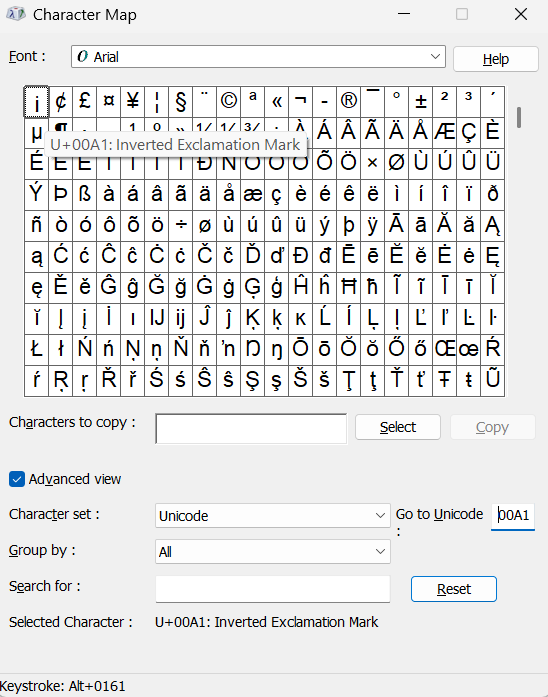
- Click the Start Menu, type Character Map, and press Enter.
- In the search field (or by scrolling), look for Inverted Exclamation Mark.
- Click on the upside down exclamation point to highlight it.
- Click the Copy button.
- Paste the symbol into your document, browser, email, or text field using Ctrl + V.
How to Type Upside Down Exclamation Mark on Mac
Mac users can type the upside down exclamation point (¡) quickly using a built-in keyboard shortcut. This method works on macOS laptops and desktops across all major applications.
Using the Mac Keyboard Shortcut
- Place your cursor where you want the upside down exclamation point to appear.
- Hold the Option (⌥) Key, then press 1.
- Release Both Keys
Result: ¡
This is the fastest method for macOS users and works in Safari, Chrome, Pages, Microsoft Word, Google Docs, Mail, and most other apps.
How to Type Upside Down Exclamation Mark on iPhone & Android
Typing the upside down exclamation mark on mobile devices is simple, even though it’s hidden behind long-press options.
- Open your keyboard
- Switch to numbers/symbols (
?123) - Press and hold the ! key
- Select ¡
This method works on most modern iPhone and Android keyboards.
How to Type Upside Down Exclamation Mark on Chromebook
- Place your Cursor where you want the symbol.
- Press Ctrl + Shift + U, a small underlined u will appear.
- Type 00A1
- Press Enter or Space
Result: ¡
Spanish Exclamation Mark Rules (Quick Guide)
When writing Spanish, follow these rules:
- Always use both opening and closing marks
- The upside down exclamation mark goes before the exclamatory phrase
- Capitalization rules stay the same
Correct:
¡Hola!
¡Esto es increíble!
Incorrect:
Hola!
Esto es increíble!
Can You Use the Upside Down Exclamation Mark in English?
Grammatically, no—but stylistically, yes.
Some people use the upside down exclamation mark in:
- Creative writing
- Social media captions
- Branding and logos
- Informal texting
Example:
¡This is awesome!
While not standard English, it’s widely understood online.
Final Thoughts
The upside down exclamation point (¡) is more than just a flipped symbol—it’s a functional part of Spanish grammar that improves clarity and expression. Whether you’re learning Spanish, typing on a Mac, or searching for the correct alt code, knowing how to use and type it properly saves time and avoids frustration.
- Related
- Learn about Spanish N or N with Tilde